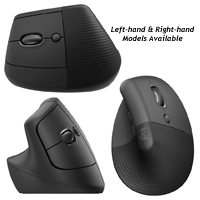
The Lift Vertical Mouse from Logitech is styled after the larger MX Vertical Advance Ergonomic Mouse. The Lift, designed specifically for small to medium-sized hands, offers the same fixed 57° to reduce the risks associated with pronation of the ...
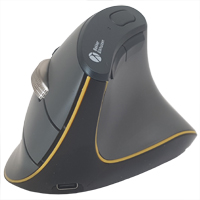
The Lift Vertical Mouse from Logitech is styled after the larger MX Vertical Advance Ergonomic Mouse. The Lift, designed specifically for small to medium-sized hands, offers the same fixed 57° to reduce the risks associated with pronation of the forearm. The angled body is designed to provide some support necessary for the hand to "relax" while engaged with the mouse.
The Lift Vertical Mouse is equipped with a top quality sensor capable of reading from 400 - 4000 DPI. With a nominal setting of 1000 DPI, the Lift can be adjusted anywhere within the range in 100 DPI increments. The DPI button, just behind the scroll wheel, offers easy access to dpi adjustment for basic or fine control movements. The scroll wheel has a rubber tire for grip and features distinct but soft detents, with the operation almost silent. There are 5 programmable buttons (left, right, back, forward, & middle click).
The buttons on the Lift feature a light curvature to facilitate a more natural curl to the fingers and to provide more control. The left and right buttons require low effort to activate and are almost silent, with the tactile response being a better indicator of switch activation than the sound. However, the hard plastic of the buttons could lead to pinching the mouse between the thumb and fingers in an attempt to achieve a better sensation of control.
The Lift Vertical Mouse offers 2 wireless connection options: 2.4Ghz Logi Bolt Receiver with an operation distance up to 33 feet, and Bluetooth (Bluetooth Low Energy Technology required). It is powered by a single AA battery that the manufacture claims can provide up to 24 months of use (of course, individual usage may affect this). Using Logitech "FLOW" it is possible to connect with and control up to 3 computing devices using a single mouse.
Models For ultra-low resistance mousing, add a Microthin Wow!Pad to your desktop and save 70% or more on selected models.
Model #
Description
Price
In Stock?
Buy Now
910-006491
Logitech Lift Right Handed Vertical Mouse, (Bluetooth Low Energy / 2.4 GHz RF Wireless [USB-A]) NO ETA.
$130.00
No
910-006492
Logitech Lift Left Handed Vertical Mouse, (Bluetooth Low Energy / 2.4 GHz RF Wireless [USB-A]) NO ETA.
$130.00
No
910-006467
Logitech Lift Left Handed Vertical Mouse, (Bluetooth Low Energy / 2.4 GHz RF Wireless [USB-A]) NO 30 DAY CSG.
$130.00
Yes
910-006466
Logitech Lift Right Handed Vertical Mouse, (Bluetooth Low Energy / 2.4 GHz RF Wireless [USB-A]) NO 30 DAY CSG.
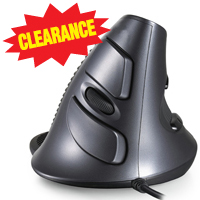
The CST3645 Vertical Mouse allows the hand to adopt a nearly vertical (approximately 60°) hand position while mousing. The unit has raised 'ridges' where the hand and thumb make contact with the mouse to prevent pockets of heat from forming when usi ...
The CST3645 Vertical Mouse allows the hand to adopt a nearly vertical (approximately 60°) hand position while mousing. The unit has raised 'ridges' where the hand and thumb make contact with the mouse to prevent pockets of heat from forming when using the mouse for extended periods of time. The thin contoured left and right click buttons are on the right side of the mouse (with a clickable vertical scroll wheel nested between), and two convenient thumb buttons perform Back and Forward actions. There is a dpi toggle on top of the mouse to adjust between 600, 1000 and 1600 dpi. A removable palm support 'surround' at the rear of the mouse prevents the edge of the hand from dragging on the surface when moving the mouse, encouraging mouse movements to be made with the entire arm.
Models For ultra-low resistance mousing, add a Microthin Wow!Pad to your desktop and save 70% or more on selected models.
Model #
Description
Price
In Stock?
Buy Now
CST3645
CST3645 Vertical Mouse, (USB-A) Original Price $80. Is now 65% off - $28 / unit !!! NO 30 DAY CSG. DISCONTINUED. CLEARANCE.
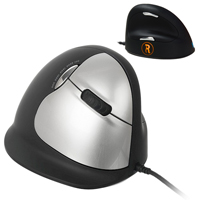
The R-Go Break HE Ergonomic Mouse from R-Go Tools is a proactive model of the HE Ergonomic Mouse which includes customizable "Break Reminder" software and a coloured visual reminder on the mouse. The Break model features the same design and functiona ...
The R-Go Break HE Ergonomic Mouse from R-Go Tools is a proactive model of the HE Ergonomic Mouse which includes customizable "Break Reminder" software and a coloured visual reminder on the mouse. The Break model features the same design and functionality of the other HE Ergonomic Mouse models, rotating the hand upward and outward. This angled posture reduces strain on the tissues of the forearm when compared with the traditional pronated "palm down" position. In addition, because the hand is now elevated up and away from the surface, users are no longer able to "plant" the heel of their hand in the manner that the traditional mouse position encourages. This virtually eliminates the potential for the development of RSI from repetitive or sustained wrist extension.
The customizable "Break Reminder" software provides a mechanism for users to set the duration and spacing of break periods as a well as a maximum daily use. The software monitors computer activity and changes the logo colour between Green (Good), Orange (Break Reminder), and Red (Break was skipped or daily usage limit exceeded). The R-Go HE Ergonomic Mouse is also available in a standard Wired model as well as the Wireless model for cord-free convenience. Note: When selecting the appropriate size of R-Go Mouse the hand should be measured from the tip of the middle finger to the first crease in the wrist.
Models For ultra-low resistance mousing, add a Microthin Wow!Pad to your desktop and save 70% or more on selected models.
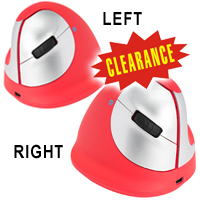
The R-Go HE Sport Ergonomic Mouse from R-Go Tools rotates the hand upward and outward. This angled posture reduces strain on the tissues of the forearm when compared with the traditional pronated "palm down" position. In addition, because the hand is ...
The R-Go HE Sport Ergonomic Mouse from R-Go Tools rotates the hand upward and outward. This angled posture reduces strain on the tissues of the forearm when compared with the traditional pronated "palm down" position. In addition, because the hand is now elevated up and away from the surface, users are no longer able to "plant" the heel of their hand in the manner that the traditional mouse position encourages. Thus, the potential for the development of RSI from repetitive or sustained wrist extension is virtually eliminated.
The R-Go HE Sport Ergonomic Mouse offers support for the hand and fingers, encouraging users to let their hand relax against the natural contours. The R-Go HE Sport is sized to accommodate hand sizes ranging from 6.5" to 7.3" in length, is available in both Left and Right. It is equipped with a 4-level sensor that can read from 800-2400 DPI.
The R-Go HE Sport Ergonomic Mouse features a striking red body with contrasting silver buttons. The highly textured thumbrest ensures firm control but users with high sensitivity may find the braille-like nodules less than comfortable. Connectivity is via Bluetooth so this model will only connect with computers that are Bluetooth-enabled. For non-bluetooth environments there are both Wired and a 2.4 GHZ Wireless models available. The wired BREAK model provides also visual cues to remind users to take regular breaks in order to reduce the risk of developing RSI. Note: When selecting the appropriate size of R-Go Mouse the hand should be measured from the tip of the middle finger to the first crease in the wrist.
Models For ultra-low resistance mousing, add a Microthin Wow!Pad to your desktop and save 70% or more on selected models.
Model #
Description
Price
In Stock?
Buy Now
RGOHEREDR
Right Handed, Medium, 800/1200/1600/2400 DPI, (Bluetooth) Original Price $110.00, Is now $10.00 OFF !!!
The Penguin Ambidextrous Vertical Mouse from Posturite permits either hand to rest comfortably on the base, while maintaining a relaxed vertical orientation alongside the body of the mouse. Because the hand rests on the base and not on the desk, most ...
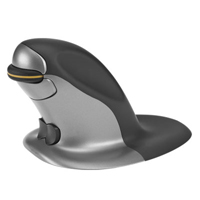
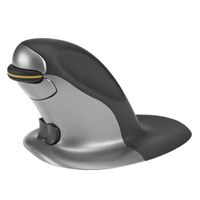
The Penguin Ambidextrous Vertical Mouse from Posturite permits either hand to rest comfortably on the base, while maintaining a relaxed vertical orientation alongside the body of the mouse. Because the hand rests on the base and not on the desk, most movement of the mouse is achieved by employing the larger motor muscles in the forearm and upper arm. However, finer cursor control can be still be achieved with small hand and/or finger movements. The ambidextrous design and central "bow-tie" switch allow for easy transitioning between right and left handed use, encouraging load-balancing use throughout the day. The weight of the hand resting on the base ensures easy movement and control, greatly limiting any need to "grip" the mouse, and thus permitting the fingers to remain relaxed while still being in optimal position for clicking. Features include adjustable DPI (400, 600, 800, or 1200) and a precision scroll wheel. The Penguin is available in both wired and wireless rechargeable models.
In order to better meet the ergonomic requirements of the broadest range of individuals, the Penguin Mouse is available in 3 sizes - Small, Medium,and Large. This Sizing Chart can assist in determining which model will provide the best fit for those with hands that are evenly proportioned. However, for cases where unusually long fingers or a very broad palm exist we encourage you to contact us for sizing assistance.
La Penguin Ambidextrous Vertical Mouse de Posturite permet à l'une ou l'autre main de reposer confortablement sur la base, tout en maintenant une orientation verticale. Comme la main repose sur la base et non sur le bureau, la plupart des mouvements de la souris sont effectués en utilisant les muscles moteurs plus importants de l'avant-bras et du bras. Toutefois, il est possible d'obtenir un contrôle plus fin du curseur par de petits mouvements de la main et/ou des doigts. La conception ambidextre et le bouton "bow-tie" permettent de passer facilement de la main droite à la main gauche, encourageant ainsi une utilisation équilibrée tout au long de la journée. Le poids de la main reposant sur la base assure un mouvement et un contrôle faciles, limitant grandement tout besoin de "saisir" la souris, et permettant ainsi aux doigts de rester détendus tout en étant dans une position optimale pour cliquer. Parmi ses caractéristiques, le DPI ajustable (400, 600, 800 ou 1200), une molette de défilement de précision, et une couche antimicrobien BioCote à base d'argent). La Penguin est disponible en modèles avec fil aussi que sans fil rechargeable.
Afin de mieux répondre aux exigences ergonomiques du plus grand nombre de personnes, la souris Penguin est disponible en trois tailles : Petite, Moyenne et Grande. Ce Tableau des Tailles peut aider à déterminer le modèle qui conviendra le mieux aux personnes dont les mains sont de proportion égale. Toutefois, en cas de doigts inhabituellement longs ou de paume très large, nous vous encourageons à nous contacter pour obtenir une assistance avec la taille.
Models For ultra-low resistance mousing, add a Microthin Wow!Pad to your desktop and save 70% or more on selected models.
The Penguin Ambidextrous Vertical Mouse Wireless from Posturite permits either hand to rest comfortably on the base, while maintaining a relaxed vertical orientation alongside the body of the mouse. Because the hand rests on the base and not on the d ...
The Penguin Ambidextrous Vertical Mouse Wireless from Posturite permits either hand to rest comfortably on the base, while maintaining a relaxed vertical orientation alongside the body of the mouse. Because the hand rests on the base and not on the desk, most movement of the mouse is achieved by employing the larger motor muscles in the forearm and upper arm. However, finer cursor control can be still be achieved with small hand and/or finger movements. The ambidextrous design and central "bow-tie" switch allow for easy transitioning between right and left handed use, encouraging load-balancing use throughout the day. The weight of the hand resting on the base ensures easy movement and control, greatly limiting any need to "grip" the mouse, and permits the fingers to remain relaxed while still being in optimal position for clicking. Features include 4 level adjustable DPI (see Specifications and a precision scroll wheel. The Penguin Mouse is also available in a wired model.
In order to better meet the ergonomic requirements of the broadest range of individuals, the Penguin Mouse is available in 3 sizes - Small, Medium,and Large. This Sizing Chart can assist in determining which model will provide the best fit for those with hands that are evenly proportioned. However, for cases where unusually long fingers or a very broad palm exist, please contact us for sizing assistance.
La Penguin Ambidextrous Vertical Mouse Wireless de Posturite permet à l'une ou l'autre main de reposer confortablement sur la base, tout en maintenant une orientation verticale. Comme la main repose sur la base et non sur le bureau, la plupart des mouvements de la souris sont effectués en utilisant les muscles moteurs plus importants de l'avant-bras et du bras. Toutefois, il est possible d'obtenir un contrôle plus fin du curseur par de petits mouvements de la main et/ou des doigts. La conception ambidextre et le bouton "bow-tie" permettent de passer facilement de la main droite à la main gauche, encourageant ainsi une utilisation équilibrée tout au long de la journée. Le poids de la main reposant sur la base assure un mouvement et un contrôle faciles, limitant grandement tout besoin de "saisir" la souris, et permettant ainsi aux doigts de rester détendus tout en étant dans une position optimale pour cliquer. Parmi ses caractéristiques, le DPI ajustable (400, 600, 800 ou 1200), une molette de défilement de précision, et une couche antimicrobien BioCote à base d'argent). La Penguin est aussi disponible avec fil.
Afin de mieux répondre aux exigences ergonomiques du plus grand nombre de personnes, la souris Penguin est disponible en trois tailles : Petite, Moyenne et Grande. Ce Tableau des Tailles peut aider à déterminer le modèle qui conviendra le mieux aux personnes dont les mains sont de proportion égale. Toutefois, en cas de doigts inhabituellement longs ou de paume très large, nous vous encourageons à nous contacter pour obtenir une assistance avec la taille.
Models For ultra-low resistance mousing, add a Microthin Wow!Pad to your desktop and save 70% or more on selected models.
Penguin Ambidextrous Vertical Mouse, Medium, Cordless, Rechargeable, USB Note: this model has been replaced by the 100016307 model listed below DISCONTINUED. CALL.
$n/a
No
100016307
Penguin Ambidextrous Vertical Mouse Wireless, Medium, Rechargeable, (Bluetooth / 2.4 GHz RF Wireless [USB-A]) CALL. NO ETA.
$n/a
No
982-0103
Penguin Ambidextrous Vertical Mouse, Large, Cordless, Rechargeable, USB Note: this model has been replaced by the 100016308 model listed below DISCONTINUED. CALL.
$n/a
No
100016308
Penguin Ambidextrous Vertical Mouse Wireless, Large, Rechargeable, (Bluetooth / 2.4 GHz RF Wireless [USB-A]) CALL. NO ETA.
The Penclic Mouse (3rd Generation) provides an effortless and intuitive way to move the cursor with fine precision by employing motions similar to those used when writing with a pen. The pen can freely pivot in a recessed circular depression (ball/so ...
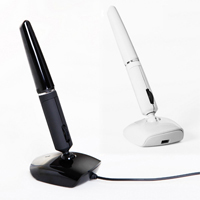
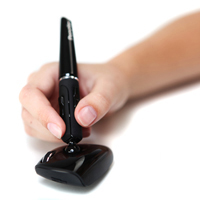
The Penclic Mouse (3rd Generation) provides an effortless and intuitive way to move the cursor with fine precision by employing motions similar to those used when writing with a pen. The pen can freely pivot in a recessed circular depression (ball/socket joint) on the base, allowing the user to find the best angle and orientation of the pen to maximize comfort and precision. The base itself glides to provide mouse control, and the movement of the base is achieved by using the small muscles and joints of the fingers as opposed to the larger muscle groups of the shoulder and arm. As the orientation can accommodate a wide range of positions, the user is able to move the mouse with either fine or gross movements (and accompanying positions) which can help to reduce any one set of repetitive movements. The design of the Penclic Mouse (3rd Generation) is also ambidextrous, enabling the user to easily balance the workload between the left and right hands. A number of improvements were made on this latest Penclic such as moving the scroll wheel onto the pen for easier access and better control. The buttons have also been simplified and are more intuitive and easy to use.
NOTE: This item is discontinued. As such we are unable to offer a 30 Day Customer Satisfaction Guarantee or warranty on this product.
Models For ultra-low resistance mousing, add a Microthin Wow!Pad to your desktop and save 70% or more on selected models.
Model #
Description
Price
In Stock?
Buy Now
B3
Penclic (3rd Generation), 4 buttons with scroll wheel, Bluetooth (does not include Bluetooth dongle), white. DISCONTINUED.
$n/a
No
D3
Penclic (3rd Generation), 4 buttons with scroll wheel, wired, black, USB DISCONTINUED. CALL.
The FastForward 3-Mode Vertical Mouse from Bakker Elkhuizen positions the hand rotated upward and outward to a more vertical angle which reduces pronation. By moving away from the traditional palm-down position, the strain on the soft tissues of the ...
The FastForward 3-Mode Vertical Mouse from Bakker Elkhuizen positions the hand rotated upward and outward to a more vertical angle which reduces pronation. By moving away from the traditional palm-down position, the strain on the soft tissues of the forearm can be greatly reduced. The body of the FastForward is also designed to provide a comfortable supportive structure for the hand, encouraging the adoption of a position where the fingers relax to curl and rest naturally over the buttons. The angled position and the support offered to the hand encourage mouse movement from the arm rather than the wrist, encouraging a more neutral alignment of the wrist while working.
The FastForward is capable of connecting via Bluetooth (supports 2 device connections), 2.4 GHz wireless (using the included USB-C receiver which stores in the mouse), or as a corded mouse when using the dual-purpose USB-C charging/data cord. Note that the FastForward is USB-C native but can be used with an adapter (not included) to connect to a USB-A port. The rechargeable battery offers an average of 4-months of use between charges. NOTE: DO NOT attempt to charge the FastForward using a Quick Charger (see manual for details)
The FastForward has five sensor settings ranging from 1000-5000 DPI. These allow for fine-tuning cursor sensitivity to match work requirements or individual control preference. It is also equipped with a weighted metal scroll wheel that is easily spun to instantly jump to the start or end of documents or web pages, can be used for traditional scrolling with lightly detectable tactile detents, or can be clicked to use the mouse to scroll vertically. It is also equipped with Back and Forward buttons, a Productivity Button that instantly opens the Task Window, and a dual function multi-colour DPI/Battery Warning Indicator light. The underside of the mouse gives access to the wireless mode switch and a power switch that is selectable for Windows or Mac use as well an having an OFF setting to extend battery life.
Models For ultra-low resistance mousing, add a Microthin Wow!Pad to your desktop and save 70% or more on selected models.
Model #
Description
Price
In Stock?
Buy Now
BNEFF3MVM
FastForward 3-Mode Vertical Mouse, (Bluetooth (x2), 2.4GHz [USB-C], Wired [USB-C]) NO ETA.
The Penclic Mouse from Penclic is an elegant precision mouse using a 'pen-shaft' design to make moving your cursor as easy as writing with a pen. Mouse buttons are on the pen-shaft for quick access, while there is a scroll wheel on the base. Availabl ...
The Penclic Mouse from Penclic is an elegant precision mouse using a 'pen-shaft' design to make moving your cursor as easy as writing with a pen. Mouse buttons are on the pen-shaft for quick access, while there is a scroll wheel on the base. Available in wireless or corded models.
NOTE: This item is discontinued. As such we are unable to offer a 30 Day Customer Satisfaction Guarantee or warranty on this product.
Models For ultra-low resistance mousing, add a Microthin Wow!Pad to your desktop and save 70% or more on selected models.
Model #
Description
Price
In Stock?
Buy Now
B2
Penclic AB Penclic Mouse, for right hand use, 6 buttons, with scroll wheel, White, Bluetooth (does not include Bluetooth dongle) DISCONTINUED. CALL.
The Rockstick Mouse offers an ingenious alternative to address the single most repetitive activity while using a computer - generating left mouse clicks. Instead of clicking a button, the user need only 'rock' the 'stick' portion of the mouse (tilti ...
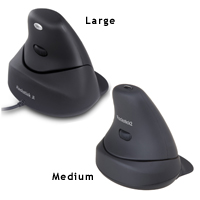
The Rockstick Mouse offers an ingenious alternative to address the single most repetitive activity while using a computer - generating left mouse clicks. Instead of clicking a button, the user need only 'rock' the 'stick' portion of the mouse (tilting it slightly to the left for a left click, and to the right for a right click). Finally, users can mouse without lifting a finger! This makes this mouse a potentially good alternative for individuals with trigger finger, arthritis, or anyone who has difficulty clicking when using the mouse by allowing individuals to use the muscles in their entire hand to click instead of being limited to the strength and endurance of a single finger.
The base of the mouse supports the hand and provides control of the mouse without the need to 'grip' the mouse. The vertical orientation of the Rockstick also eliminates pronation which is the rotation to a palm down position which for some people can also lead to discomfort while mousing.
At the top of the stick is a vertical scroll wheel which can be clicked to generate middle clicks. The Rockstick Mouse comes in two sizes, a Small/Medium size and a Large size, and is corded.
La Rockstick Mouse offre une alternative ingénieuse pour adresser l'activiter du répétition unique pendant l'usage de l'ordinateur - générer les clics gauche du souris. Au lieu de faire le clic avec un bouton, vous avez seulement besoin de faire un mouvement "rock" the "stick" du souris (la pencher ce portion du souris légèrement à la gauche pour avoir un clic gauche, et la pencher à la droite pour avoir un clic droite). Finalement, vous pouvez bouger une souris sans lever un doigt! Cela donne cette souris une alternative potentielle pour des gens avec des mal douleurs trigger finger, ou l'arthrite, ou n'importe qui qui a de la difficulté a faire un clic avec une souris en utilisant le muscle dans le tout de la main pour faire le clic au lieu d'être limiter de force et endurance d'un doigt seul.
La base du souris support la main et offre le control sans le besoin de serré la souris. L'orientation vertical du souris Rockstick vient en deux tailles avec fil, un petit/moyen et un grand.
Models For ultra-low resistance mousing, add a Microthin Wow!Pad to your desktop and save 70% or more on selected models.
Model #
Description
Price
In Stock?
Buy Now
RS1201M
Microtouch Rockstick Mouse, Small/Medium Size, Black with Gray Inlay in Base, 800 DPI, PC/Mac compatible, USB DISCONTINUED. CALL.
$n/a
No
RS1201L
Microtouch Rockstick Mouse, Large Size, Black with Gray Inlay in Base, 800 DPI, PC/Mac compatible, USB DISCONTINUED.
The 3M Ergonomic Mouse (formerly the Renaissance Mouse) features a unique, vertical grip design which largely eliminates pronation. It is ideal for those who have limited articulation of their fingers and need to 'hook' their hand onto a mouse. The ...
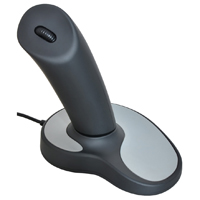
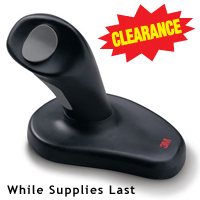
The 3M Ergonomic Mouse (formerly the Renaissance Mouse) features a unique, vertical grip design which largely eliminates pronation. It is ideal for those who have limited articulation of their fingers and need to 'hook' their hand onto a mouse. The mouse is for right handed individuals only and available in both a wired and wireless model.
La 3M Ergonomic Mouse (connu auparavant comme la souris Renaissance Mouse) a une charactéristique unique qui est une prise verticale qui élémine la pronation de grande façon. Elle est idéale pour les usageurs qui veulent l'articulation minimale des doigts et qui veulent avoir une sensation d'accrocher la main sur une souris. La souris est seulement pour les usageurs(euses) droitier(ière) et est disponible avec fil, aussi quand modèl sans fil.
Models For ultra-low resistance mousing, add a Microthin Wow!Pad to your desktop and save 70% or more on selected models.
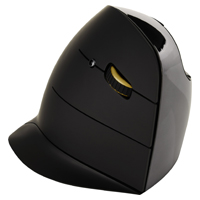
The clearly defined lines of the Evoluent VerticalMouse C naturally encourage correct hand placement by guiding the hand to the position of greatest comfort. A slight inward curve on the front half of the Evoluent VerticalMouse C permits the fingers ...
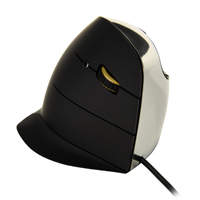
The clearly defined lines of the Evoluent VerticalMouse C naturally encourage correct hand placement by guiding the hand to the position of greatest comfort. A slight inward curve on the front half of the Evoluent VerticalMouse C permits the fingers to curl naturally and to relax against the buttons. The high gloss front contrasts with the black satin-finish control surfaces. This satin finish permits the hand to easily slide into position when transitioning between keyboard and mouse.
The Evoluent C features three primary buttons (left, middle and right click) and two secondary thumb buttons (back and forward). Unlike other Evoluent VerticalMouse models, these primary buttons on the Evoluent VerticalMouse C are integrated into the body of the mouse, eliminating the break between "body" and "button". Support for the little finger is provided by a support flange molded into the body of the mouse. A high quality scroll wheel with soft detents is angled slightly downward to facilitate a natural scrolling action by the index or middle fingers. (Note: The scroll wheel on the Evoluent VerticalMouse C is NOT "clickable".) Button functions are pre-assigned but may be reprogrammed using the free downloadable Evoluent Mouse Manager software. The software offers access to a wide range of additional functions, including an auto-click option that can be activated to reduce repetitive left clicking.
The Evoluent VerticalMouse C is also equipped with a high-performance four-level sensor. The pointer speed can easily be cycled through the settings from low to high using the small button located just behind the scroll wheel. LEDs on the shoulder of the mouse indicate the active setting.
The Evoluent VerticalMouse C is styled to serve those with larger hands or longer fingers. The design features a forward slant, resulting in longer buttons that may offer more support for longer fingers than those on the VerticalMouse 4. Despite being able to better accommodate larger or longer hands than the VM4, the "footprint" of the VerticalMouse C is slightly shorter and narrower, requiring no additional surface space. Note: If a clickable scroll wheel is important the VerticalMouse 4 (standard size) or the Medium or Large models of the VerticalMouse D should be considered. Be sure to consult the appropriate sizing guides when making a size selection.
The Evoluent VerticalMouse C is also available in a Wireless (VMCRW) version.
For hands that are identified as being more suited to a Small model there are both Wired and Wireless Evoluent VerticalMouse 4 Small models available. The Small provides all of the ergonomic benefits provided by the Standard Evoluent VerticalMouse 4 but is better suited to those with smaller hands.
L'Evoluent VerticalMouse C introduit un profil et une allure nouvelle aux Evoluent VerticalMouse. La forme clairement défini de la souris Evoluent VerticalMouse C encourage naturellement la position de la main au position de grand confort. Une courbe léger vers l'intérieur de la côté devant de la souris Evoluent VerticalMouse C permet les doigts de courber naturellement et de relaxer sur les boutons. Le devant est avec haute brillance contraste avec les surfaces de contrôle en satin noir. Cette finition satinée permet à la main de glisser facilement en position sur la souris lors de la transition entre le clavier et la souris.
L'Evoluent C a trois boutons primaires (clic gauche, milieu et droit) et de deux boutons secondaires pour le pouce (arrière et avant). Contrairement aux autres modèles Evoluent VerticalMouse, ces boutons primaires sur l'Evoluent VerticalMouse C sont intégrés dans la partie principale de la souris, éliminant la séparation entre la partie principale et les boutons. Le support pour le petit doigt est moulé dans la partie principale de la souris. Une roulette de défilement de haute qualité avec des bosses très léger est inclinée légèrement vers le bas pour faciliter une action de défilement naturelle de l'index ou du doigt du milieu. (Veuillez noter: la roulette de défilement de l'Evoluent VerticalMouse C n'est PAS cliquable). Les fonctions des boutons sont pré-désigner, mais peuvent être reprogrammées à l'aide du logiciel Evoluent Mouse Manager gratuit téléchargeable. Le logiciel offre l'accès à une grande gamme de fonctions supplémentaires, y compris une option de clic automatique qui peut être activée pour réduire le clic gauche.
La souris Evoluent VerticalMouse C est équipé avec un capteur haute performance à quatre niveaux. La vitesse du pointeur peut être changer facilement du plus lent au plus rapide en utilisant le petit bouton situé juste derrière la roulette de défilement. Les LED au-dessus de la souris indiquent le réglage actuel.
La souris Evoluent VerticalMouse C est adapté pour les personnes ayant des mains plus larges ou des doigts plus longs. Sa forme est incliné vers l'avant, ce qui se traduit par des boutons plus longs qui peuvent offrir un meilleur soutien aux doigts plus longs que ceux de la VerticalMouse 4. Bien qu'elle puisse mieux s'adapter à des mains plus grandes ou plus longues que la VM4, l'"empreinte" de la VerticalMouse C est légèrement plus courte et plus étroite, ne nécessitant pas d'espace supplémentaire.
Veuillez noter: Si une roulette de défilement cliquable est importante, la souris VerticalMouse 4 (taille Standard) , ou le Medium ou Large de la souris VerticalMouse D Avec Fil doivent être considérer. Veuillez à consulter les guides des tailles appropriés.
La souris Evoluent VerticalMouse C est aussi disponible en modèle Sans Fil (VMCRW).
Si la taille de la main est petite, le Small est disponible en modèle Avec Fil et Sans Fil . La Small offre tout les avantages ergonomiques que la Standard Evoluent VerticalMouse 4 mais est plus adaptée pour les petits mains.
The clearly defined lines of the Evoluent VerticalMouse C Wireless naturally encourage correct hand placement by guiding the hand to the position of greatest comfort. A slight inward curve on the front half of the Evoluent VerticalMouse C permits the ...
The clearly defined lines of the Evoluent VerticalMouse C Wireless naturally encourage correct hand placement by guiding the hand to the position of greatest comfort. A slight inward curve on the front half of the Evoluent VerticalMouse C permits the fingers to curl naturally and to relax against the buttons. The high gloss front contrasts with the black satin-finish control surfaces. This satin finish permits the hand to easily slide into position when transitioning between keyboard and mouse.
The Evoluent C features three primary buttons (left, middle and right click) and two secondary thumb buttons (back and forward). Unlike other Evoluent VerticalMouse models, these primary buttons on the Evoluent VerticalMouse C are integrated into the body of the mouse, eliminating the break between "body" and "button". Support for the little finger is provided by a support flange molded into the body of the mouse. A high quality scroll wheel with soft detents is angled slightly downward to facilitate a natural scrolling action by the index or middle fingers. (Note: The scroll wheel on the Evoluent VerticalMouse C is NOT "clickable".) Button functions are pre-assigned but may be reprogrammed using the free downloadable Evoluent Mouse Manager software. The software offers access to a wide range of additional functions, including an auto-click option that can be activated to reduce repetitive left clicking.
The Evoluent VerticalMouse C is also equipped with a high-performance four-level sensor. The pointer speed can easily be cycled through the settings from low to high using the small button located just behind the scroll wheel. LEDs on the shoulder of the mouse indicate the active setting.
The Evoluent VerticalMouse C is styled to serve those with larger hands or longer fingers. The design features a forward slant, resulting in longer buttons that may offer more support for longer fingers than those on the VerticalMouse 4. Despite being able to better accommodate larger or longer hands than the VM4, the "footprint" of the VerticalMouse C is slightly shorter and narrower, requiring no additional surface space. Note: If a clickable scroll wheel is important the VerticalMouse 4 Wireless (standard size) or the Medium or Large models of the VerticalMouse D Wireless should be considered. Be sure to consult the appropriate sizing guides when making a size selection.
The Evoluent VerticalMouse C is also available in a Wired (VMCR) version.
For hands that are identified as being more suited to a Small model there are both Wired and Wireless Evoluent VerticalMouse 4 Small models available. The Small provides all of the ergonomic benefits provided by the Standard Evoluent VerticalMouse 4 but is better suited to those with smaller hands.
L'Evoluent VerticalMouse C Wireless introduit un profil et une allure nouvelle aux Evoluent VerticalMouse. La forme clairement défini de la souris Evoluent VerticalMouse C encourage naturellement la position de la main au position de grand confort. Une courbe léger vers l'intérieur de la côté devant de la souris Evoluent VerticalMouse C permet les doigts de courber naturellement et de relaxer sur les boutons. Le devant est avec haute brillance contraste avec les surfaces de contrôle en satin noir. Cette finition satinée permet à la main de glisser facilement en position sur la souris lors de la transition entre le clavier et la souris.
L'Evoluent C a trois boutons primaires (clic gauche, milieu et droit) et de deux boutons secondaires pour le pouce (arrière et avant). Contrairement aux autres modèles Evoluent VerticalMouse, ces boutons primaires sur l'Evoluent VerticalMouse C sont intégrés dans la partie principale de la souris, éliminant la séparation entre la partie principale et les boutons. Le support pour le petit doigt est moulé dans la partie principale de la souris. Une roulette de défilement de haute qualité avec des bosses très léger est inclinée légèrement vers le bas pour faciliter une action de défilement naturelle de l'index ou du doigt du milieu. (Veuillez noter: la roulette de défilement de l'Evoluent VerticalMouse C n'est PAS cliquable). Les fonctions des boutons sont pré-désigner, mais peuvent être reprogrammées à l'aide du logiciel Evoluent Mouse Manager gratuit téléchargeable. Le logiciel offre l'accès à une grande gamme de fonctions supplémentaires, y compris une option de clic automatique qui peut être activée pour réduire le clic gauche.
La souris Evoluent VerticalMouse C Wireless est équipé avec un capteur haute performance à quatre niveaux. La vitesse du pointeur peut être changer facilement du plus lent au plus rapide en utilisant le petit bouton situé juste derrière la roulette de défilement. Les LED au-dessus de la souris indiquent le réglage actuel.
La souris Evoluent VerticalMouse C Wireless est adapté pour les personnes ayant des mains plus larges ou des doigts plus longs. Sa forme est incliné vers l'avant, ce qui se traduit par des boutons plus longs qui peuvent offrir un meilleur soutien aux doigts plus longs que ceux de la VerticalMouse 4. Bien qu'elle puisse mieux s'adapter à des mains plus grandes ou plus longues que la VM4, l'"empreinte" de la VerticalMouse C est légèrement plus courte et plus étroite, ne nécessitant pas d'espace supplémentaire.
Veuillez noter: Si une roulette de défilement cliquable est importante, la souris VerticalMouse 4 Wireless (taille Standard) , ou le Medium ou Large de la souris VerticalMouse D Sans Fil doivent être considérer. Veuillez à consulter les guides des tailles appropriés.
La souris Evoluent VerticalMouse C est aussi disponible en modèle Avec Fil (VMCR).
Si la taille de la main est petite, le Small est disponible en modèle Avec Fil et Sans Fil . La Small offre tout les avantages ergonomiques que la Standard Evoluent VerticalMouse 4 mais est plus adaptée pour les petits mains.
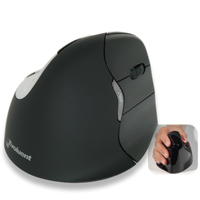
The VerticalMouse 4 Bluetooth for Mac features a unique patented contoured design that transforms the traditional palm down mousing position into a vertical handshake position. This "vertical" position is designed to reduce stress in the forearm and ...
The VerticalMouse 4 Bluetooth for Mac features a unique patented contoured design that transforms the traditional palm down mousing position into a vertical handshake position. This "vertical" position is designed to reduce stress in the forearm and elbow and offers increased comfort for many individuals. The flange along the bottom of the mouse prevents the fifth finger from dragging on the desk and a uniquely sculpted thumb rest provides not only a relaxed resting place for the thumb but also a means for enhanced control of the mouse.
The VerticalMouse 4 Bluetooth for Mac offers performance-based features including an easy-to-access pointer speed button on the side of the mouse. This offers settings of Extra Low, Low, Medium and High, allowing the appropriate acceleration and degree of precision to be selected for each task. Light activation buttons reduce the force level required, especially important when doing the intensive clicking required in most applications. Basic mouse functionality is available without a driver but those wishing to optimize the ergonomic benefits of their Evoluent VerticalMouse may wish to consider installing the MouseManager programming software for expanded functionality, including customizable access to all 6 buttons on the mouse.
The Bluetooth for Mac model is only available in the Righthanded Standard size but the Evoluent VerticalMouse 4 is also available in a 2.4GHz Wireless as well as Left and Right hand Wired models (Mac and PC compatible).
Choose the Correct Size: Selecting a mouse that best matches hand size is important when addressing ergonomic issues. This printable Sizing Guide can be used to determine whether a SMALL or STANDARD size Evoluent VerticalMouse 4 is the appropriate size.
For hands that are identified as being more suited to a Small model there are both Wired and Wireless Evoluent VerticalMouse 4 Small models available. The Small provides all of the ergonomics benefits provided by the Standard Evoluent VerticalMouse 4 but is better suited to those with smaller hands.
La souris Evoluent VerticalMouse 4 Bluetooth est contourer d'une façon unique, car sa conception brevetée transforme la position traditionnel d'une souris avec la paume vers le bas (plat) à une position détendue verticale comme une poignée de main. Cette position "verticale" est conçu pour réduire des douleurs dans l'avant-bras et coude aussi qu'offrire du confort augmenté pour beaucoup d'utilisateurs. Le bride le long du bas de la souris empêche le petit doigt de l'utilisateur de glisser (frotter) sur le bureau. Le repose pouce uniquement sculpter offre un endroit confortable pour le pouce, et pour améliorer le contrôle.
La souris VerticalMouse 4 Bluetooth pour Mac offre caractéristiques de performance incluent un bouton plus accèssible qui contôle la vitesse du pointeur sur le côter de la souris pour permettre l'utilisateur de choisir entre très basse, basse, moyen, et haute, qui donne la capacité de choisir le degré du précision nécessaire pour faire chaque tâche. Les boutons d'activation légère réduisent le niveau de force nécessaire, ce qui est particulièrement important lors des clics intensifs requis dans la plupart des applications. La fonctionnalité de base de la souris est disponible sans pilote, mais ceux qui souhaitent optimiser les avantages ergonomiques de leur Evoluent VerticalMouse peuvent considérer d'installer le logiciel de programmation MouseManager pour une fonctionnalité étendue, y compris un accès personnalisable aux 6 boutons de la souris.
Le modèle Bluetooth pour Mac est seulement disponible en taille Standard pour Droitiers, mais l'Evoluent VerticalMouse 4 est également disponible en modèle 2.4 GHz Sans Fil ainsi que dans des modèles pour Droitiers et Gauchers Avec Fil (compatibles Mac et PC).
Choisir la Bonne Taille:
Pour bien répondre aux besoins ergonomiques, le choix de taille de la souris est important, pour bien correspondre à la taille de la main. Voici un Sizing Guide qui peut être imprimer, pour aider à déterminer si la taille SMALL ou STANDARD de la souris Evoluent VerticalMouse 4 est une bonne taille.
Si la taille de la main est petite, le Small est disponible en modèle Avec Fil et Sans Fil . La Small offre tout les avantages ergonomiques que la Standard Evoluent VerticalMouse 4 mais est plus adaptée pour les petits mains.
The Rockstick2 Mouse retains all of the benefits and functionality of the original Rockstick Mouse but introduces a new design and added capabilities. As with the original Rockstick Mouse, the Rockstick2 addresses one of the most repetitive activitie ...
The Rockstick2 Mouse retains all of the benefits and functionality of the original Rockstick Mouse but introduces a new design and added capabilities. As with the original Rockstick Mouse, the Rockstick2 addresses one of the most repetitive activities of computer use--generating mouse clicks. Rather than using one or two fingers to click a button, the user simply rocks the body of the mouse, tilting it slightly to the left or right to generate a click. The strenth of the entire hand can be used to generate the click, rather than the much more limited strength of the index or middle fingers. This makes the Rockstick Mouse2 a potentially good alternative for individuals with trigger finger or arthritis, or for anyone who has difficulty clicking the buttons on a conventional mouse.
The new design is also ambidextrous, enabling both left- and right-handed users to experience the benefits. The scroll wheel is located on the inside of the mouse, where it can be accessed easily by the thumb. This newest model also features variable DPI and a flange to keep the little finger clear of the worksurface. Two size options (Small/Medium and Large) are available.
Models For ultra-low resistance mousing, add a Microthin Wow!Pad to your desktop and save 70% or more on selected models.
Model #
Description
Price
In Stock?
Buy Now
RS200CL
Microtouch Rockstick2 Mouse, Wired, Large DISCONTINUED. CALL.
$n/a
No
RS200CM
Microtouch Rockstick2 Mouse, Wired, Medium DISCONTINUED. CALL.
$n/a
No
RS200WL
Microtouch Rockstick2 Mouse, Wireless, Large DISCONTINUED. CALL.
$n/a
No
RS200WM
Microtouch Rockstick2 Mouse, Wireless, Medium DISCONTINUED. CALL.
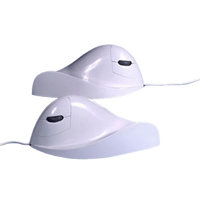
The AirO2Bic Vertical Mouse is designed using the science of Biomechanics. The idea of the AirO2Bic is to immobilize your wrist and force you to use your upper arm muscles exclusively to move the mouse. To use this mouse properly you need a minimum o ...
The AirO2Bic Vertical Mouse is designed using the science of Biomechanics. The idea of the AirO2Bic is to immobilize your wrist and force you to use your upper arm muscles exclusively to move the mouse. To use this mouse properly you need a minimum of a 10" x 12" (25.4 cm x 30.5 cm) mousing area.
This product is available in both left and right handed models in both pearl (white) and onyx (black). The optional Nib software provides an auto-click feature, eliminating the need to 'click' the mouse, which is quite practical for web surfing and other non-cursor dependent tasks. The Nib software is $55 when purchased with this mouse and this bundle is called the Virtually Hands Free Mousing System. The Nib software is also available for $80 when purchased by itself.
Sale Price (White Left Handed Unit Only): $95.00
Models For ultra-low resistance mousing, add a Microthin Wow!Pad to your desktop and save 70% or more on selected models.