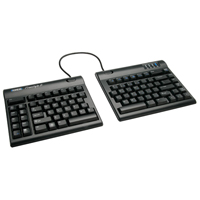
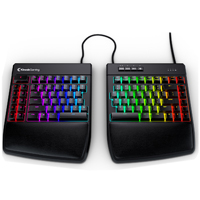
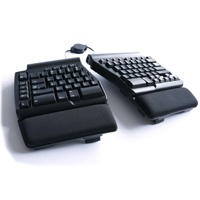
One of the most versatile keyboards currently manufactured, the Freestyle2 is an adjustable, separated keyboard offering considerable ergonomic benefits. The Freestyle2 Keyboard is divided into two separate modules connected by either a 9" (the most ...
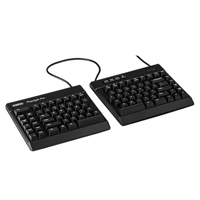
One of the most versatile keyboards currently manufactured, the Freestyle2 is an adjustable, separated keyboard offering considerable ergonomic benefits. The Freestyle2 Keyboard is divided into two separate modules connected by either a 9" (the most common) or 20" cable. This separation enables individuals to position the left and right sides of the keyboard shoulder width apart, allowing the shoulders, elbows, arms and wrists to relax in an anatomically neutral position. This greatly improves posture and blood flow in the upper body, prevents undesirable rotation at the shoulders, and eliminates ulnar deviation at the wrist.
The compact symmetrical layout is achieved by removing the numeric keypad found on the right side of most keyboards. This reduces the reach for the mouse for right-handed individuals and optimizes the workspace for everyone. The Freestyle2 Keyboard provides access to numbers along the top row, as well as via an easily toggled numeric layer embedded into the right-hand module. (Please see the Numeric Keypads category for external numeric keypads that are compatible with the Freestyle2 Keyboard.)
The Freestyle2 Keyboard features low-force, tactile membrane keyswitches. At only 45 grams, this is at least 25% less force than most traditional and even many other ergonomic keyboards. Rated at 10 million actuations, the keyswitches on the Freestyle2 will provide years of quiet, comfortable typing.
Note: The Freestyle2 Keyboard comes with a component that secures the two modules together at a pivot point. Although this Pivot Tether is intended primarily to secure the two modules during transport, it can be used, to create a splayed (i.e. joined at the centre top) keyboard. However, this configuration will significantly limit the ergonomic benefits.
The Freestyle2 Keyboard can also be further customized with one or more Accessory Kits. (Note: Accessory Kits sold separately. See Detailed Specifications for more information.) With the addition of the appropriate Accessory Kit, this already highly configurable keyboard can be customized to provide even more ergonomic benefits.
Le plus polyvalent de tout les claviers fabriqués au courant, le Freestyle2 est un clavier ajustable et séparé qui offre des avantages considérables de l`ergonomie sans sacrifier la productivité. Le Freestyle2 est divisé en deux modules/morceaux séparés. Les deux morceaux sont attachés avec 9 pouces de câble (le plus commun), et est aussi disponible en modèl avec 20 pouces. La séparation permet l`utilisateur de mettre le côté gauche et le côté droite du clavier de la largeur des épaules, qui permet les épaules, les coudes, les bras et les poignets d`être relax dans une position anatomique et neutre. Cela améliore la posture considérablement aussi que la circulation sanguine dans le haut du corps, prévente la rotation des épaules indésirable, et élimine la déviation ulnaire dans les poignets.
Le concept compact, symétrique (atteidre par éliminer le pavé numérique qui est typiquement sur les claviers standards) réduit la nécessité de s`étendre pour chercher la souris pour l`utilisateur de main gaucher et droitier. Le clavier Freestyle2 Keyboard fournis l'accès aux numéros sur la première ligne en haut du clavier, aussi que par un pavé numérique intégré dans le module/morceau du côté droite basculer façilement. (Voir la catégorie des Numeric Keypads pour les pavé numériques externes qui sont compatible avec le clavier Freestyle2 Keyboard.)
Une caractéristique du clavier Freestyle2 Keyboard est des interrupteurs de type membrane sensible avec clic audible tranquille. A seulement 45 gramms, cela est au moins 25% de force moin que sur les claviers standard et même beaucoup de claviers ergonomiques. Évalué à 10 million activations, les interrupteurs sur le clavier Freestyle2 vont pouvoir offrire des années de dactylo plus agréable et tranquille.
Veuillez Noter: Le clavier Freestyle2 Keyboard vient avec un morceau pivot qui sécure les deux moitiés du clavier ensemble. Même si l`accessoire Pivot Tether est crée principalement pour sécure les deux moitiés du clavier ensemble durant le transport, il peut être utilisé pour créer un clavier ébrasé (relier en haut du clavier, au centre). Par contre, cela réduit considérablement les avantages ergonomique.
Le clavier Freestyle2 peut être personnalisé plus loin avec un ou plus des Accessory Kits. (Veuillez Noter: Les Accessory Kits sont vendu séparément. Voir Detailed Specifications pour plus d`information.) Avec l`addition du Accessory Kit approprier, ce clavier, qui est déja très configurable, peut être personnalisé pour offrire plus d`avantages ergonomiques.
Models
Model #
Description
Price
In Stock?
Buy Now
KB800PB-US
Freestyle2 Keyboard, US English Layout, 9" Separation
$125.00
Yes
KB800PB-US-20
Freestyle2 Keyboard, US English Layout, 20" Separation
$150.00
Yes
KB800PB-FC
Freestyle2 Keyboard, French Canadian Bilingual Layout, 9" Separation
$127.50
Yes
KB800PB-FC-20
Freestyle2 Keyboard, French Canadian Bilingual Layout, 20" Separation
$190.00
Yes
KB820PB-US
Freestyle2 Keyboard, US English Layout, 9" Separation, VIP3 Accessory Installed
$200.00
Yes
KB830PB-US
Freestyle2 Keyboard, US English Layout, 9" Separation, V3 Accessory Installed
With its left and right halves connected by an articulating ball joint, the Goldtouch V2 Adjustable Keyboard by Key Ovation is designed to help aid individuals in preventing or addressing soft tissue injuries that can arise from pronation, ulnar devi ...
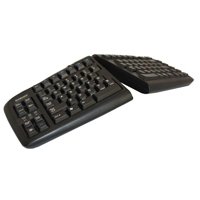
With its left and right halves connected by an articulating ball joint, the Goldtouch V2 Adjustable Keyboard by Key Ovation is designed to help aid individuals in preventing or addressing soft tissue injuries that can arise from pronation, ulnar deviation, or wrist extension. The two halves of the keyboard can be configured to tent up to 30° along the centre, allowing typing with the palms slightly facing each other at an anatomically neutral angle; to splay up to 33° outwards, allowing the hands, wrists and shoulders to be positioned for optimal posture; or to both tent and splay. The compact design, achieved by the elimination of a built-in numeric keypad, also helps to prevent strain in the shoulder and neck muscles that can be caused by overreaching for the mouse.
The Goldtouch V2 Adjustable Keyboard has rubberized feet and edges to prevent slippage on the worksurface whether flat or tented and hot keys for quick access to both the internet and multimedia controls.
There are 3 models of the Goldtouch V2 keyboard currently available. The GTN-0099 is legended in US English exclusively for PC, is native USB and comes with a USB to PS/2 adapter. The GTN99-FC is the same interface but is solely legended for the "Canadian French" uni-lingual layout (not "Canadian Multi-Lingual") in Windows. The GTU-0088 is USB and compatible with both PC and Macs, and legended for both (Mac legending is in gold in the bottom third of the keycaps).
Warning: Those who use the Goldtouch Numeric Keypad for PC or Mac with a Goldtouch V2 Adjustable Keyboard should be certain to plug the keyboard directly into the computer, or into an external USB hub. Connecting a keyboard to the computer via any of the ports on the Goldtouch Numeric Keypad can cause both devices to malfunction.
Note: See Usage Tips on the Detailed Specifications page for a comparison of the differences between the earlier version of the Goldtouch Adjustable Keyboard and the Goldtouch V2.
La largeur du V2 est plus grande(16.25" large comparer a 15.25" sur le modèl moin récent) avec des côtés caoutchoutés pour amiliorer la stabilité du clavier pendant la tente. Il utilise les touches qui ont une distance de dépression plus léger significante (4 mm), interrupteur à clé calculé a 40-45 grams qui vous donne une sensation tactile moin 'crisp' que le modèl moin récent. Les angles d`ébrase et la tente ont aussi changer sure le modèl V2- la tente maximum est 21°, et l`ébrasse maximum est 33°. Cependant, après avoir fait la tente plus de 10°, l`ébrasse maximum continue a réduire en ajoutant plus de tente.
Les modifications de la disposition inclus les clés Shift et Ctrl du côté droit, aussi que le clé Caps Lock, on été réduit en grandeurs, et les clés Insert et Delete sont maintenant plus large et sont du côter droit en haut du clavier. Les space bars sont maintenant rectangulaires sans courbe, et, comme conséquance, sont plus minces. Et finalement, des nouveau "hot keys" pour l'internèt et controles multimedia, accèsible par composer et tenir (example, shift access) le clé FN qui est situer en bas du côté gauche du clavier.
NOTE IMPORTANTE DU COMPATIBILITÉ: Le clavier Goldtouch V2 n`est pas compatible avec la plus part des pavé numériques autonome car la touche NumLock est utiliser par le pavé numérique intégré. Par conséquent, en utilisant la touche NumLock pour accèder aux chiffres du pavé numérique séparer, le pavé numérique intégré dans le clavier va aussi ce faire activé (en fait, perdre accès au lettres). Les pavé numériques qui fonctionne bien avec ce clavier seron le pavé numérique Goldtouch (GTC-0033), le pavé numérique Low Force Tactile par Kinesis (AC210USB-BLK), et la plus part des pavé numériques de PI Engineering XKeys.
Models
Model #
Description
Price
In Stock?
Buy Now
GTN-0099
Goldtouch V2 Adjustable Keyboard, US English, PC only, USB (includes USB to PS/2 adapter)
$140.00
Yes
GTU-0088
Goldtouch V2 Adjustable Keyboard, US English, PC and Mac
$142.50
Yes
GTN99-FC
Goldtouch V2 Adjustable Keyboard, French Canadian, PC only, USB (includes USB to PS/2 adapter)
The Programmable Ergo Pro Keyboard by Matias adds custom programming functionality to the world's original adjustable, separated, mechanical keyswitch keyboard. The Programmable Ergo Pro Keyboard includes all of the features that the Ergo Pro Keyboar ...
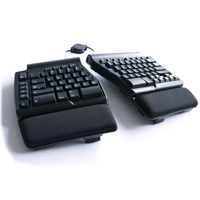
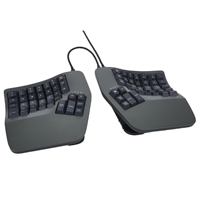
The Programmable Ergo Pro Keyboard by Matias adds custom programming functionality to the world's original adjustable, separated, mechanical keyswitch keyboard. The Programmable Ergo Pro Keyboard includes all of the features that the Ergo Pro Keyboard models are known for, with the added features of 20 keys being custom-programmable to perform macros up to 60 characters in length. The heavy duty design ensures that this essential input device will hold up to the most intense workloads when high-performance is demanded. The Matias Quiet Click mechanical keyswitches provide superior tactile feedback and the faster typing speeds achievable with mechanical keyswitches, but without the accompanying "click" of the switch and "clack" of the key bottoming out. Connected by a bridging cable, the separate left and right modules of the keyboard can be positioned shoulder-width apart to help people of all builds reduce the health risks associated with ulnar deviation and over-rotation at the shoulder.
The feet on the Programmable Ergo Pro offer two mutually exclusive orientations for the keyboard. The modules can be laterally tented 9° to create the "thumbs up" posture that reduces pronation while typing. Alternatively, the inclination of the keyboard (which is neutral by default) can be adjusted to a negative inclination of 4.5°. The efficient, symmetrical design yields a compact lateral footprint of 14.5" and this, combined with the embedded numeric keypad, greatly reduces the reach to the mouse. The spacious and generously padded palm supports come securely screwed to the keyboard, but can be removed if desired.
The Matias Quiet Click keyswitches also provide better resistance to crumbs and dust, and have a keyswitch rating of 50 million keystrokes. The key cap legends are laser etched and will not wear off even after intensive use. Bonus features include a 3-port hi-speed USB 2.0 hub and special Anti-Ghosting circuitry, which can accommodate the fastest of typing speeds without the fear of dropped characters. The Programmable Ergo Pro is also available in models for both PC and Mac environments.Note: With full separation the distance between index finger to index finger on the home row is around 17.5".
Le clavier Programmable Ergo Pro Keyboard par Matias ajoute la programmation personnalisée sur le premier clavier au monde qui est ajustable, séparé, et qui a des touches mécaniques. Le Programmable Ergo Pro Keyboard conserve toutes les fonctionnalités des modèles Ergo Pro Keyboard standard, mais offre aux gens 20 touches qui peuvent être programmées pour faire des macros jusqu'à 60 caractères. La conception robuste assure que ce périphérique fondamental va soutenir la charge de travail intense pour la performance haute. L'interrupteur mécanique clic silencieux de Matias offre la confirmation tactile supérieure et de la dactylographie plus rapide qui sont associées souvent avec les interrupteurs mécaniques sans le clic et le claquement de la touche après avoir atteindre sa fin. Reliés avec un câble, les modules séparés du côté droite et gauche peuvent se faire positionnés de manière à permettre aux gens d'éviter de ce tordre aux épaules, coudes, et poignets.
Les pieds du clavier Programmable Ergo Pro keyboard peuvent fournir des orientations mutuellement exclusives. Les modules peuvent être montés sur une tente latérale de 9° pour créer une position de "pouce en haut" pour réduire la pronation durant la dactylographie. Autrement, l'inclinaison du clavier (qui est neutre par défaut) peut se faire ajustée dans une inclinaison négative de 4.5°. L'efficace, une conception symétrique qui rend une empreinte latérale compacte de 14.5 pouces et cela, combinée avec un pavé numérique intégré, réduit significativement l'étirage pour atteindre la souris. Les supports paume spacieux sont généreusement rembourrés et sécurément vissés solide sur le clavier, mais peuvent être retirés si desirer.
Les interrupteurs de Matias offrent aussi une meilleure résistance aux miettes et aux poussières, et les interrupteurs sont évalués à 50 million frappes. Les légendes sur les capuchons des clés sont gravées au laser a l'intérieur pour que les lettres et les chiffres ne s'effacent pas, même durant l'usage intensive. De plus, il y a un concentrateur USB 2.0 de trois ports a haute vitesse et des circuits électriques anti-fantôme spéciaux (special Anti-Ghosting circuitry), qui permettent les personnes de faire la dactylographie de haute vitesse sans avoir peur de supprimer les caractères. Le Programmable Ergo Pro est disponible en deux modèles, un pour PC et un pour Mac.
Veuillez noter: Avec la séparation complète, la distance entre les doigts index quand ils sont sur la rangée médiane est environ 17.5 pouces.
Models
Model #
Description
Price
In Stock?
Buy Now
FK403QPC-P
Programmable Ergo Pro for PC
$285.00
Yes
FK403Q-P
Programmable Ergo Pro for Mac
$285.00
Yes
Accessories
Model #
Description
Price
In Stock?
Buy Now
BC403-F
Bridging Cable Accessory Kit (20 cm)
$13.00
Yes
BC403-R
Retractable Bridging Cable Accessory Kit (43 cm) NO ETA.
The Advantage360 Contoured Keyboard from Kinesis takes the proven fusion of performance and ergonomics of the 3-dimensional concave keywell design and adds in additional ergonomic capabilities. This design now incorporates established ergonomic conce ...
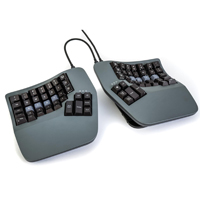
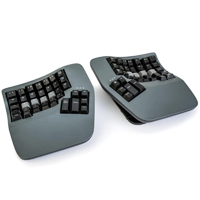
The Advantage360 Contoured Keyboard from Kinesis takes the proven fusion of performance and ergonomics of the 3-dimensional concave keywell design and adds in additional ergonomic capabilities. This design now incorporates established ergonomic concepts of customizable tent, angle and separation that Kinesis has featured for many years in their well-known Freestyle line of keyboards. This version of the Kinesis Contoured Keyboard family can now deliver unparalleled levels of comfort and productivity for touch typists of all body types and builds while offering advanced ergonomic features. The Advantage360 serves as a neutral ergonomic data input interface for all touch typists. Anyone who considers their keyboard a core tool for their workstation should consider this keyboard. The contoured keyboard family is the only keyboard that addresses ergonomics down to the level of the fingertips. It does this by intelligently redistributing the repetitive activity associated with typing to minimize the potential of fatigue. Advantage Contoured keyboards are especially popular with those who perform keyboard intensive work, including programmers, transcriptionists, writers, and web content developers.
The Advantage360 Contoured Keyboard has several improvements over prior Advantage models. The new separated design affords the individual nearly infinite freedom to position the keyboard modules to create the optimal keyboard solution for the workspace. In addition, the new 3 position tent available in each module aids in further reducing pronation and the associated risk of repetitive strain that can occur with intensive and long-term keyboarding. In order to minimize the keyboard size and reduce unnecessary finger reach the function row has been eliminated with those functions now accessible via a FN layer in the primary keys. The 10-key numeric keypad embedded in the right-hand module continues to provide instant access for numeric entry, without moving the hand out of home position.
The Advantage360 employs Gateron Brown low-force tactile mechanical keyswitches with an activation force of 45 grams and a maximum force of 55 grams. These responsive switches offer the tactile feedback that is necessary for intense and rapid data entry. The switches are topped with quality opaque PBT keycaps for longevity.
The SmartSet Programming Engine included with the Advantage360 facilitates the development and storage of up to nine custom keyboard layouts. Further reduction in repetitive or awkward keystrokes and maximizing productivity can now be achieved as far more and longer macros of up to 300 characters are possible, sufficient to satisfy even the most rigorous productivity and exacting customization demands. The Advantage360 is PC and Mac compatible, and includes additional hard-wired features such as unlimited custom key remapping, macro playback speed, and keyboard status reports.
While the standard Advantage360 will easily meet the demands of most, individuals with advanced programming skills may be interested in the the premium Advantage360 PRO model. In addition to all of the performance features and ergonomic benefits offered in the Advantage360 the PRO model adds the freedom of Bluetooth, eliminating all cords and leaving the modules totally free of encumbrances. The Advantage360 PRO is equipped with global white backlighting and shine-through ABS keycaps for working under reduced lighting conditions. Please Note:The PRO model is geared towards those with advanced programming skills and utilizes the open-source ZMK platform for customization. Layouts can be configured using a web-based configurator at GitHub. The Advantage360 PRO DOES NOT include the SmartSet Programming Engine.
Le clavier Advantage360 Contoured Keyboard de Kinesis prend la combinasion éprouvée des performances et de l'ergonomie de la forme en 3-dimensions des concave keywells et y ajoute des capacités ergonomiques supplémentaires. Cette forme intègre maintenant les concepts ergonomiques établis d'inclinaison, d'angle et de séparation personnalisables que Kinesis a établis depuis de nombreuses années dans sa gamme bien connu des claviers Freestyle. Cette version de la famille des claviers Kinesis Contoured Keyboard peut maintenant offrir des niveaux de confort et de productivité unique aux dactylographes de tous types de corps, tout en offrant des caractéristiques ergonomiques avancées. L'Advantage360 sert d'interface de saisie de données ergonomique et neutre pour tous les gens qui font beaucoup de dactylo. Toute personne qui considère leur clavier d`être un outil essentiel au travail devrait considérer ce clavier. La famille des claviers contoured sont les seuls claviers qui prennent en compte l'ergonomie jusqu'au niveau du bout des doigts. Pour ce faire, il redistribue intelligemment l'action répétitive associée avec la dactylograph afin de minimiser le potentiel de fatigue. Les claviers Advantage Contoured sont particulièrement populaire avec les personnes qui font la dactylographe intensifs incluants les programmateurs, transcripteurs, écrivains/auteurs, et dévelopeurs de contenu sur le web.
L'Advantage360 Contoured Keyboard présente plusieurs améliorations par rapport aux modèles Advantage précédents. La nouvelle conception séparée offre à l'individu une liberté presque infinie pour positionner les modules de clavier afin de créer la solution de clavier optimale pour l'espace de travail. De plus, la nouvelle inclinaison à 3 positions disponible dans chaque module permet de réduire davantage la pronation et le risque associé de tension répétitive qui peut se produire lors d'une utilisation intensive et prolongée du clavier. Afin de minimiser la taille du clavier et de réduire le risque d'étendre les doigts, la rangée de fonctions a été éliminée et les fonctions sont maintenant accessibles par une couche FN dans les touches primaires. Le pavé numérique à 10 touches intégré dans le module de droite continue de fournir un accès instantané à la saisie numérique, sans déplacer la main hors de sa position initiale.
L'Advantage360 utilise des touches mécaniques tactiles Gateron Brown à force minimal, avec une force d'activation de 45 grammes et une force maximale de 55 grammes. Ces touches réactives offrent le retour tactile nécessaire pour la dactylo intense et rapide. Les touches sont surmontées de capuchons en PBT opaques de bonne qualité pour la durabilité.
Le SmartSet Programming Engine inclus dans l'Advantage360 facilite le développement et d'avoir jusqu'à 9 dispositions de clavier personnalisées. La prise en charge de macros plus nombreuses et plus longues permet de réduire davantage les frappes répétitives ou maladroites et d'optimiser la productivité. Jusqu'à 100 macros uniques de 200 caractères suffisent à satisfaire les exigences de productivité et de personnalisation les plus rigoureuses. L'Advantage360 est compatible avec PC et Mac et comprend des fonctions supplémentaires hard-wired telles que le remappage infini des touches personnalisées, la vitesse de lecture des macros et les rapports d'état du clavier.
Alors que l'Advantage360 SmartSet avec fil répondra facilement aux besoins de la plupart, les personnes ayant des compétences avancées en programmation peuvent être intéressées par le modèle Advantage360 PRO. En plus de toutes les caractéristiques de performance et des avantages ergonomiques offerts par l'Advantage360, le modèle PRO ajoute la liberté de Bluetooth, éliminant tous les fils et laissant les modules totalement libres d'encombrement. L'Advantage360 PRO est équipé d'un rétroéclairage blanc global et de touches ABS brillant (shine-through) pour travailler dans des conditions d'éclairage réduit.
Veuillez noter: Le modèle PRO est destiné aux personnes ayant des compétences avancées en programmation et utilise l'open-source ZMK platform pour la personnalisation. Les dispositions peuvent être configurées à l'aide d'un configurateur en ligne sur GitHub. L'Advantage360 PRO N'INCLUT PAS le SmartSet Programming Engine.
Models
Model #
Description
Price
In Stock?
Buy Now
KB360-GBR
Advantage360 Contoured Keyboard, QWERTY legends, Brown Gateron mechanical keyswitches
The Limited Edition Advantage360 Linear Quiet Contoured Keyboard from Kinesis features low-force Kailh Box Pink switches with just 35 grams of activation force. As with all Advantage360 Contoured Keyboards, it takes the proven fusion of performance a ...
The Limited Edition Advantage360 Linear Quiet Contoured Keyboard from Kinesis features low-force Kailh Box Pink switches with just 35 grams of activation force. As with all Advantage360 Contoured Keyboards, it takes the proven fusion of performance and ergonomics of the 3-dimensional concave keywell design and adds in additional ergonomic capabilities. This design now incorporates established ergonomic concepts of customizable tent, angle and separation that Kinesis has featured for many years in their well-known Freestyle line of keyboards. This version of the Kinesis Contoured Keyboard family can now deliver unparalleled levels of comfort and productivity for touch typists of all body types and builds while offering advanced ergonomic features. The Advantage360 serves as a neutral ergonomic data input interface for all touch typists. Anyone who considers their keyboard a core tool for their workstation should consider this keyboard. The contoured keyboard family is the only keyboard that addresses ergonomics down to the level of the fingertips. It does this by intelligently redistributing the repetitive activity associated with typing to minimize the potential of fatigue. Advantage Contoured keyboards are especially popular with those who perform keyboard intensive work, including programmers, transcriptionists, writers, and web content developers.
The Advantage360 Contoured Keyboard has several improvements over prior Advantage models. The new separated design affords the individual nearly infinite freedom to position the keyboard modules to create the optimal keyboard solution for the workspace. In addition, the new 3 position tent available in each module aids in further reducing pronation and the associated risk of repetitive strain that can occur with intensive and long-term keyboarding. In order to minimize the keyboard size and reduce unnecessary finger reach the function row has been eliminated with those functions now accessible via a FN layer in the primary keys. The 10-key numeric keypad embedded in the right-hand module continues to provide instant access for numeric entry, without moving the hand out of home position.
This Limited Edition Advantage360 employs Kailh Box Pink low-force tactile mechanical keyswitches with an activation force of just 35 grams. The switches are topped with quality opaque Steel Blue PBT keycaps for longevity, with contrast-coloured Home Row keycaps for easy targeting.
The SmartSet Programming Engine included with the Advantage360 facilitates the development and storage of up to nine custom keyboard layouts. Further reduction in repetitive or awkward keystrokes and maximizing productivity can now be achieved as far more and longer macros of up to 300 characters are possible, sufficient to satisfy even the most rigorous productivity and exacting customization demands. The Advantage360 is PC and Mac compatible, and includes additional hard-wired features such as unlimited custom key remapping, macro playback speed, and keyboard status reports.
While the standard Advantage360 will easily meet the demands of most, individuals with advanced programming skills may be interested in the the premium Advantage360 PRO model. In addition to all of the performance features and ergonomic benefits offered in the Advantage360 the PRO model adds the freedom of Bluetooth, eliminating all cords and leaving the modules totally free of encumbrances. The Advantage360 PRO is equipped with global white backlighting and shine-through ABS keycaps for working under reduced lighting conditions. Please Note:The PRO model is geared towards those with advanced programming skills and utilizes the open-source ZMK platform for customization. Layouts can be configured using a web-based configurator at GitHub. The Advantage360 PRO DOES NOT include the SmartSet Programming Engine.
Le clavier Advantage360 Contoured Keyboard de Kinesis prend la combinasion éprouvée des performances et de l'ergonomie de la forme en 3-dimensions des concave keywells et y ajoute des capacités ergonomiques supplémentaires. Cette forme intègre maintenant les concepts ergonomiques établis d'inclinaison, d'angle et de séparation personnalisables que Kinesis a établis depuis de nombreuses années dans sa gamme bien connu des claviers Freestyle. Cette version de la famille des claviers Kinesis Contoured Keyboard peut maintenant offrir des niveaux de confort et de productivité unique aux dactylographes de tous types de corps, tout en offrant des caractéristiques ergonomiques avancées. L'Advantage360 sert d'interface de saisie de données ergonomique et neutre pour tous les gens qui font beaucoup de dactylo. Toute personne qui considère leur clavier d`être un outil essentiel au travail devrait considérer ce clavier. La famille des claviers contoured sont les seuls claviers qui prennent en compte l'ergonomie jusqu'au niveau du bout des doigts. Pour ce faire, il redistribue intelligemment l'action répétitive associée avec la dactylograph afin de minimiser le potentiel de fatigue. Les claviers Advantage Contoured sont particulièrement populaire avec les personnes qui font la dactylographe intensifs incluants les programmateurs, transcripteurs, écrivains/auteurs, et dévelopeurs de contenu sur le web.
L'Advantage360 Contoured Keyboard présente plusieurs améliorations par rapport aux modèles Advantage précédents. La nouvelle conception séparée offre à l'individu une liberté presque infinie pour positionner les modules de clavier afin de créer la solution de clavier optimale pour l'espace de travail. De plus, la nouvelle inclinaison à 3 positions disponible dans chaque module permet de réduire davantage la pronation et le risque associé de tension répétitive qui peut se produire lors d'une utilisation intensive et prolongée du clavier. Afin de minimiser la taille du clavier et de réduire le risque d'étendre les doigts, la rangée de fonctions a été éliminée et les fonctions sont maintenant accessibles par une couche FN dans les touches primaires. Le pavé numérique à 10 touches intégré dans le module de droite continue de fournir un accès instantané à la saisie numérique, sans déplacer la main hors de sa position initiale.
L'Advantage360 utilise des touches mécaniques tactiles Gateron Brown à force minimal, avec une force d'activation de 45 grammes et une force maximale de 55 grammes. Ces touches réactives offrent le retour tactile nécessaire pour la dactylo intense et rapide. Les touches sont surmontées de capuchons en PBT opaques de bonne qualité pour la durabilité.
Le SmartSet Programming Engine inclus dans l'Advantage360 facilite le développement et d'avoir jusqu'à 9 dispositions de clavier personnalisées. La prise en charge de macros plus nombreuses et plus longues permet de réduire davantage les frappes répétitives ou maladroites et d'optimiser la productivité. Jusqu'à 100 macros uniques de 200 caractères suffisent à satisfaire les exigences de productivité et de personnalisation les plus rigoureuses. L'Advantage360 est compatible avec PC et Mac et comprend des fonctions supplémentaires hard-wired telles que le remappage infini des touches personnalisées, la vitesse de lecture des macros et les rapports d'état du clavier.
Alors que l'Advantage360 SmartSet avec fil répondra facilement aux besoins de la plupart, les personnes ayant des compétences avancées en programmation peuvent être intéressées par le modèle Advantage360 PRO. En plus de toutes les caractéristiques de performance et des avantages ergonomiques offerts par l'Advantage360, le modèle PRO ajoute la liberté de Bluetooth, éliminant tous les fils et laissant les modules totalement libres d'encombrement. L'Advantage360 PRO est équipé d'un rétroéclairage blanc global et de touches ABS brillant (shine-through) pour travailler dans des conditions d'éclairage réduit.
Veuillez noter: Le modèle PRO est destiné aux personnes ayant des compétences avancées en programmation et utilise l'open-source ZMK platform pour la personnalisation. Les dispositions peuvent être configurées à l'aide d'un configurateur en ligne sur GitHub. L'Advantage360 PRO N'INCLUT PAS le SmartSet Programming Engine.
Models
Model #
Description
Price
In Stock?
Buy Now
KB360-KLQ
Advantage360 Linear Quiet Contoured Keyboard, QWERTY legends, Kailh Pink Box Linear Quiet mechanical keyswitches
The Advantage360 PRO Contoured Keyboard from Kinesis takes the proven fusion of performance and ergonomics of the 3-dimensional concave keywell design and adds in additional ergonomic capabilities. This design now incorporates established ergonomic c ...
The Advantage360 PRO Contoured Keyboard from Kinesis takes the proven fusion of performance and ergonomics of the 3-dimensional concave keywell design and adds in additional ergonomic capabilities. This design now incorporates established ergonomic concepts of customizable tent, angle and separation that Kinesis has featured for many years in their well-known Freestyle line of keyboards. This version of the Kinesis Contoured Keyboard family can now deliver unparalleled levels of comfort and productivity for touch typists of all body types and builds while offering advanced ergonomic features and the added versatility of cordless Bluetooth connectivity. The Advantage360 serves as a neutral ergonomic data input interface for all touch typists. Anyone who considers their keyboard a core tool for their workstation should consider this keyboard. The contoured keyboard family is the only keyboard that addresses ergonomics down to the level of the fingertips. It does this by intelligently redistributing the repetitive activity associated with typing to minimize the potential of fatigue. Advantage Contoured keyboards are especially popular with those who perform keyboard intensive work, including programmers, transcriptionists, writers, and web content developers.
The Advantage360 Contoured Keyboard has several improvements over prior Advantage models. The new separated design affords the individual nearly infinite freedom to position the keyboard modules to create the optimal keyboard solution for the workspace. In addition, the new 3 position tent available in each module aids in further reducing pronation and the associated risk of repetitive strain that can occur with intensive and long-term keyboarding. In order to minimize the keyboard size and reduce unnecessary finger reach the function row has been eliminated with those functions now accessible via a FN layer in the primary keys. The 10-key numeric keypad embedded in the right-hand module continues to provide instant access for numeric entry, without moving the hand out of home position.
The Advantage360 employs Gateron Brown low-force tactile mechanical keyswitches with an activation force of 45 grams and a maximum force of 55 grams. These responsive switches offer the tactile feedback that is necessary for intense and rapid data entry. In order to take advantage of the global white backlighting on the PRO model the switches are topped with shine-through ABS plastic keycaps. For those who are willing to sacrifice the shine-through feature for higher quality PBT keycaps there are optional QWERTY, DVORAK and Blank sets of opaque PBT keycaps available.
The Advantage360 PRO version offers almost unlimited programmability through the open-source ZMK Programming Engine, available online through GitHub. This advanced programming interface, which is designed for those with at least some degree of programming knowledge, can accommodate an exceptional degree of customization for the Advantage360 PRO. Because of the programming knowledge required to perform customization on the Advatage360 PRO model it is recommended that prior to purchasing this model purchasers should acquaint themselves with the ZMK platform and determine its suitability for their knowledge level.
For individuals who may not be comfortable with the advanced programming requirements for customizing the Advantage360 PRO, the corded Advantage360 comes preloaded with the highly-functional and much more intuitive SmartSet Programming Engine which facilitates the development and storage of up to nine custom keyboard layouts. Further reduction in repetitive or awkward keystrokes and maximizing productivity can now be achieved as far more and longer macros of up to 300 characters, sufficient to satisfy even the most rigorous productivity and exacting customization demands, are now supported. The Advantage360 is PC and Mac compatible, and includes additional hard-wired features such as unlimited custom key remapping, macro playback speed, and keyboard status reports. The corded Advantage360 is also equipped with high quality opaque PBT keycaps.
Le clavier Advantage360 PRO Contoured Keyboard de Kinesis prend la combinasion éprouvée des performances et de l'ergonomie de la forme en 3-dimensions des concave keywells et y ajoute des capacités ergonomiques supplémentaires. Cette forme intègre maintenant les concepts ergonomiques établis d'inclinaison, d'angle et de séparation personnalisables que Kinesis a établis depuis de nombreuses années dans sa gamme bien connu des claviers Freestyle. Cette version de la famille des claviers Kinesis Contoured Keyboard peut maintenant offrir des niveaux de confort et de productivité unique aux dactylographes de tous types de corps, tout en offrant des caractéristiques ergonomiques avancées et la polyvalence supplémentaire de la connectivité Bluetooth sans fil. L'Advantage360 sert d'interface de saisie de données ergonomique et neutre pour tous les gens qui font beaucoup de dactylo. Toute personne qui considère leur clavier d`être un outil essentiel au travail devrait considérer ce clavier. La famille des claviers contoured sont les seuls claviers qui prennent en compte l'ergonomie jusqu'au niveau du bout des doigts. Pour ce faire, il redistribue intelligemment l'action répétitive associée avec la dactylograph afin de minimiser le potentiel de fatigue. Les claviers Advantage Contoured sont particulièrement populaire avec les personnes qui font la dactylographe intensifs incluants les programmateurs, transcripteurs, écrivains/auteurs, et dévelopeurs de contenu sur le web.
L'Advantage360 Contoured Keyboard présente plusieurs améliorations par rapport aux modèles Advantage précédents. La nouvelle conception séparée offre à l'individu une liberté presque infinie pour positionner les modules de clavier afin de créer la solution de clavier optimale pour l'espace de travail. De plus, la nouvelle inclinaison à 3 positions disponible dans chaque module permet de réduire davantage la pronation et le risque associé de tension répétitive qui peut se produire lors d'une utilisation intensive et prolongée du clavier. Afin de minimiser la taille du clavier et de réduire le risque d'étendre les doigts, la rangée de fonctions a été éliminée et les fonctions sont maintenant accessibles par une couche FN dans les touches primaires. Le pavé numérique à 10 touches intégré dans le module de droite continue de fournir un accès instantané à la saisie numérique, sans déplacer la main hors de sa position initiale.
L'Advantage360 utilise des touches mécaniques tactiles Gateron Brown à force minimal, avec une force d'activation de 45 grammes et une force maximale de 55 grammes. Ces touches réactives offrent le retour tactile nécessaire pour la dactylo intense et rapide. Afin de prendre avantage du rétroéclairage blanc global du modèle PRO, les touches sont surmontées de capuchons en plastique ABS brillant (shine-through). Pour ceux qui sont prêts à sacrifier la caractéristique de brillance (shine-through) pour des touches PBT de meilleure qualité, les touches PBT opaques de QWERTY, DVORAK et Blank sont disponibles comme options.
La version Advantage360 PRO offre une programmabilité presque infini grâce au open-source ZMK platform, disponible en ligne sur GitHub. Cette interface de programmation avancée, conçue pour les personnes ayant au moins quelques connaissances en programmation, permet un degré exceptionnel de personnalisation de l'Advantage360 PRO. En raison des connaissances en programmation requises pour personnaliser le modèle Advatage360 PRO, il est recommandé aux acheteurs, avant d'acheter ce modèle, de se familiariser avec la ZMK platform et de déterminer si elle convient à leur niveau de connaissances.
Pour les personnes qui ne sont pas à l'aise avec les exigences de programmation avancées pour la personnalisation de l'Advantage360, l'Advantage360 avec fil est préchargé avec le SmartSet Programming Engine, hautement fonctionnel et beaucoup plus intuitif, qui facilite le développement et d'avoir jusqu'à 9 dispositions de clavier personnalisées. La prise en charge de macros plus nombreuses et plus longues permet de réduire davantage les frappes répétitives ou maladroites et d'optimiser la productivité. Jusqu'à 100 macros uniques de 200 caractères suffisent à satisfaire les exigences de productivité et de personnalisation les plus rigoureuses. L'Advantage360 est compatible avec PC et Mac et comprend des fonctions supplémentaires hard-wired telles que le remappage infini des touches personnalisées, la vitesse de lecture des macros et les rapports d'état du clavier. L'Advantage360 avec fil est également équipé de capuchons de touches PBT opaques de haute qualité.
Models
Model #
Description
Price
In Stock?
Buy Now
KB360-PRO-GBR
Advantage360 PRO Contoured Keyboard, QWERTY legends, Brown Gateron mechanical keyswitches
$655.00
Yes
KB360-PRO-KLQ
Advantage360 Linear Quiet Contoured Keyboard, QWERTY legends, Kailh Pink Box Linear Quiet mechanical keyswitches
The Split Break Ergonomic Keyboard from R-Go Tools is designed to accommodate a range of usage options. The Wired model includes two (12" and 19") joining cables, while the Bluetooth model has a permanent 10" cable that accommodates the needs of most ...
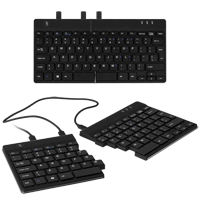
The Split Break Ergonomic Keyboard from R-Go Tools is designed to accommodate a range of usage options. The Wired model includes two (12" and 19") joining cables, while the Bluetooth model has a permanent 10" cable that accommodates the needs of most typists. These cables make it possible to fully separate the left and right keyboard modules, allowing the shoulders, elbows, arms and wrists to relax in an anatomically neutral position. This greatly improves posture and circulation in the upper body, prevents undesirable inward rotation at the shoulders, and can eliminate ulnar deviation at the wrist. The exceptionally thin (9 mm) profile of the Split Break Ergonomic Keyboard also greatly reduces the potential of developing RSI related to wrist extension. For those less comfortable with the concept of a separated keyboard the innovative magnetic interlocking design also permits the two keyboard modules to be combined into a more traditional one-piece compact keyboard just 11.4" in width.
Unlike most other separated keyboards, the Split Break Ergonomic Keyboard is asymmetrical, due to the absence of any extra keys on the left module. However, the compact layout greatly reduces the reach to the mouse for right-handed individuals and retains the standard minimal reach for left-handed mousing.
For those who may need to occasionally perform greater amounts of numeric entry, the right hand module on the Wired model includes an embedded numeric keypad layer that can be activated via the NumLock key. Note: the Bluetooth model does NOT include the embedded numeric keypad function.
Those who are doing more intense numeric entry may wish to consider the R-Go Numpad Break, a matching discrete numeric keypad that is available in both Wired and Bluetooth models.
The Split Break Ergonomic Keyboard features low-travel scissor switch membrane key switches with chiclet-style keycaps. Those looking for an easily portable keyboard that offers advanced ergonomic benefits may want to consider this keyboard. The ultra-compact design and under 300 gram weight of the Split Ergonomic Keyboard make it highly suited for travel applications. An integrated "break" reminder can be activated to serve as a reminder to take regular relief breaks when working.
Le Split Ergonomic Keyboard de R-Go Tools est conçu pour satisfaire diverses options d'utilisation. En utilisant l’un des deux câbles(12po et 19po), les utilisateurs peuvent positionner les modules de clavier gauche et droit à la largeur des épaules, permettant ainsi aux épaules, aux coudes, aux bras et aux poignets de se détendre dans une position anatomiquement neutre. Cela améliore considérablement la posture et la circulation sanguine dans le haut du corps, empêche la rotation indésirable des épaules et élimine les déviations ulnaires au poignet. Le profil exceptionnellement fin (9 mm) du Split Ergonomic Keyboard réduit également considérablement le potentiel de développement de RSI lié à l'extension du poignet.
Pour les personnes moins à l'aise avec le concept d`un clavier séparé, la conception innovante magnétique permet également de combiner les deux modules de clavier dans un clavier compact plus traditionnel d'une seule morceau mésurant 11,4 pouces en largeur.
Contrairement à la plupart des claviers séparés, le Split Ergonomic Keyboard est asymétrique, en raison de l'absence de touches supplémentaires sur le module de gauche. Cependant, la structure compacte réduit considérablement de s`étirer pour chercher la souris pour les utilisateurs droitiers et conserve la distance minimal pour s`étirer pour la souris avec la main gauche.
Un pavé numérique est incorporée dans le module du droite pour les utilisateurs qui doivent parfois effectuer de plus grandes entrer numériques et est facilement accessible à l'aide de la touche Verr Num (NumLock). Les ports micro-USB gauche et droit sont disponibles pour la connexion de pavés numériques externes.
Le Split Ergonomic Keyboard comprend des touche à membrane avec interrupteurs à ciseaux (distance court) et des touches capuchons à chiclet. Les utilisateurs qui veulent un clavier facilement portable offrant des avantages ergonomiques avancés peuvent considérer ce clavier. Le concept ultra-compact et le poids moins de 300 grammes du Split Ergonomic Keyboard le rendent parfaitement adapté aux applications de mobile/portable.
Veuillez noter: Le R-Go Numpad Break NE PEUT PAS être brancher dans le R-Go Split Ergonomic Keyboard, et va avoir besoin de soit un port USB-C ou USB-A.
Models
Model #
Description
Price
In Stock?
Buy Now
RGOSP-USWIBL
R-Go Tools Split Break Ergonomic Keyboard, Wired, Black
$130.00
Yes
RGOSBUSWLBL
R-Go Tools Split Break Ergonomic Keyboard, Bluetooth, Black
The Freestyle Pro Keyboard from Kinesis Corporation integrates proven ergonomics and TenKeyLess* design in a mechanical keyboard packed with the latest in custom programmability and performance. The result is a keyboard that offers the advanced funct ...
The Freestyle Pro Keyboard from Kinesis Corporation integrates proven ergonomics and TenKeyLess* design in a mechanical keyboard packed with the latest in custom programmability and performance. The result is a keyboard that offers the advanced functionality that high performance workers demand while providing the same ergonomic benefits that tens of thousands of everyday computer operators have enjoyed for years.
Based on the proven ergonomic design of the Freestyle2, the Freestyle Pro is an adjustable, separated keyboard offering extensive ergonomic benefits. The Freestyle Pro Keyboard is divided into two separate modules. The two halves are connected by a linking cable that can be adjusted to provide from 12" to 21.5" of separation. This separation frees individuals to position the left and right portions of the keyboard shoulder width apart, so the shoulders, elbows, arms and wrists can relax in an anatomically neutral position. This greatly improves posture and blood flow in the upper body, prevents undesirable rotation at the shoulders, and eliminates ulnar deviation at the wrist.The symmetrical, compact design (achieved by eliminating the 10-key numeric pad) reduces the reach for the mouse on both the left- and right-hand while still providing numeric keypad entry via the embedded numeric keypad. Those who want a stand-alone numeric keypad have the option of adding either the Mechanical Keypad for PC and Mac or the Freestyle2 Keypad for PC.
The Freestyle Pro Keyboard is available equipped with two styles of Cherry MX Keyswitches. The Cherry MX Brown are tactile mechanical keyswitches that have an activation force rating of 45 grams. The tactility, combined with the audible click on activation, is intended to assist in reducing the degree of unnecessary force and overall effort by providing notification when downward movement is no longer required. The Cherry MX "Quiet" Red Linear switch also has a 45 gram activation force but has no tactile or audible indicators to indicate that switch activation has occurred. Individuals need to "learn" the point at which activation occurs and adjust their finger action and force levels accordingly. While not totally silent the "Quiet" Red switches generate noticeably less noise than the Brown.
The feature-rich Freestyle Pro Keyboard is packed with power. The SmartSet Programming Engine supports on-the-fly remapping of any key and the 4 MB onboard memory (the v-Drive) can store up to 9 dual-layer fully programmable layouts for instant access or program-specific commands. The left hand module also features a convenient bank of 8 pre-programmed keys for one-touch access to common shortcut and navigation commands. High speed typists will appreciate the full NKRO mode and 100% Anti-Ghosting design that means no lost keystrokes or commands. A 1 ms response time (1000 MHz polling) means instant response for the performance-minded. Media controls are easily accessed via the embedded FN layer that remains available regardless of which custom layout is currently active.
The Freestyle Pro Keyboard offers full funtionality with Windows 7-10, Mac OSX v10.4+, Android, Chrome, or Linux and comes pre-programmed in default QWERTY layout. As a bonus both Mac and Dvorak secondary layouts are also pre-programmed and ready for access. Mac enthusiasts will appreciate the option of creating a true "Mac" layout using the 4 included Mac keycaps. The included keycap puller will make keyboard customization to Dvorak or custom layouts quick and easy.
Le Freestyle Pro Keyboard par Kinesis Corporation intègre une ergonomie éprouvée et un design TenKeyLess* dans un clavier mécanique doté avec beaucoup de programmation plus récente et de performance personnalisées. Le résultat est un clavier qui offre les fonctionnalités avancées que les utilisateurs de haute performance exigent tout en offrant les mêmes avantages ergonomiques que des dizaines de milliers d'utilisateurs ont apprécier pendant des années.
Basé sur les modèles ergonomiques éprouvé du Freestyle2, le Freestyle Pro est un clavier réglable et séparé offrant des avantages ergonomiques considérables. Le Freestyle Pro Keyboard est divisé en deux modules/morceaux séparés. Les deux morceaux sont attachés avec un câble qui peut être ajuster en longeur entre 12po à 21.5po. La séparation permet l`utilisateur de mettre le côté gauche et le côté droite du clavier de la largeur des épaules, qui permet les épaules, les coudes, les bras et les poignets d`être relax dans une position anatomique et neutre. Cela améliore la posture considérablement aussi que la circulation sanguine dans le haut du corps, évite la rotation des épaules indésirable, et élimine la déviation ulnaire dans les poignets. La conception symétrique et compacte (obtenue en éliminant le pavé numérique à 10 touches) réduit le risque de s`étirer pour chercher la souris à gauche et à droite tout en permettant l`entrée des données par le pavé numérique intégré. Ceux qui souhaitent un pavé numérique autonome ont la possibilité d`ajouter soit le Mechanical Keypad for PC ou le Freestyle2 Keypad for PC and Mac .
Le Freestyle Pro Keyboard est disponible en deux sorte d`interrupteurs Cherry MX. Le Cherry MX Brown sont des interrupteurs tactile mécanique avec une force d`activation de 45 grams. Le tactilité, ensemble avec le clic audible sur l'activation, est destinée à aider les utilisateurs à réduire le degré de force inutile et l'effort global en les notifiant lorsque le mouvement vers le bas n'est plus nécessaire. Le Cherry MX "Quiet" Red Linear a aussi le 45 grams de force d`activation mais qui na pas de tacilité ni de clic audible pour indiquer quand l`interrupteur est complèt. Par conséquence, les gens ont besoin d`apprendre à quel point que la touche est activer et de s`ajuster les actions et le niveau de force des doigts. Tandis que le "Quiet" Red ne sont pas complètement silencieux, l`interrupteur fait moin de bruit que le Cherry MX Brown.
Le clavier Freestyle Pro est riche en fonctionnalités. Le moteur de programmation SmartSet permet de reconfigurer immédiatement n'importe quelle touche. La mémoire embarquée de 4 MB onboard memory (le v-Drive) peut stocker jusqu'à 9 configurations à double couche entièrement programmables pour un accès instantané ou des commandes spécifiques au programme. Le côté gauche comporte également une banque pratique de 8 touches préprogrammées pour un accès direct aux commandes de raccourci et de navigation commun. Les dactylos à haute vitesse apprécieront le mode NKRO complet et le 100% Anti-Ghosting, ce qui signifie qu'il n'y a pas de touches ou de commandes perdues. Un temps de réponse de 1 ms (1000 MHz polling) signifie une réponse instantanée pour les utilisateurs soucieux de performance. Les contrôles de média sont facilement accessibles via la couche FN intégrée qui reste disponible quelle que soit la disposition.
Le Freestyle Pro Keyboard est complètement compatible avec Windows 7-10, Mac OSX v10.4+, Android, Chrome OS, ou Linux et vient pré-programmer en QWERTY. En plus, les dispositions secondaires de Mac et Dvorak sont également préprogrammées et prêtes pour l'accès. Les utilisateurs Mac apprécieront la possibilité de créer une disposition «Mac» en utilisant les 4 touches Mac qui sont inclus. L'extracteur de capuchons (keycap puller) inclus rendra la personnalisation du clavier pour Dvorak ou des dispositions personnalisées rapide et facile.
Models
Model #
Description
Price
In Stock?
Buy Now
KB900-BRN
Freestyle Pro Keyboard, Cherry MX Brown TACTILE Switches, 45 gram activation force
$260.00
Yes
KB900-RDQ
Freestyle Pro Keyboard, Cherry MX "Quiet" Red LINEAR Switches, 45 gram activation force
Kinesis Extra Long Linking Cable Accessory for Freestyle Edge keyboard, supports 65" - 74" of separation Please Note: Installation of the cable by non-Kinesis personnel will void the keyboard warranty.
Up Your Game! with the Freestyle Edge RGB Split Mechanical Gaming Keyboard from Kinesis Gaming, now offering Great Looks, High-end Performance, and Advanced Ergonomics.
There is no longer a need to sacrifice performance in pur ...
Up Your Game! with the Freestyle Edge RGB Split Mechanical Gaming Keyboard from Kinesis Gaming, now offering Great Looks, High-end Performance, and Advanced Ergonomics.
There is no longer a need to sacrifice performance in pursuit of ergonomics. The Freestyle Edge RGB Split Mechanical Gaming Keyboard from Kinesis Gaming integrates proven ergonomics and TenKeyLess design in a premium mechanical keyboard featuring fully addressable RGB lighting and packed with the latest in custom programmability and performance. The result is a keyboard that not only looks great and offers the advanced functionality and high performance that everyone demands but also provides the same ergonomic benefits that tens of thousands have enjoyed for years.
The Freestyle Edge RGB features fully addressable RGB lighting, meaning every single key can be customized. The Freestyle Edge RGB comes with each of the 9 layouts pre-programmed with one of the lighting effects. The SmartSet APP provides customization of individual key colours, speed, direction, and zone to create personalized visual effects. The lighting can even be synced to respond to sound from within a game.
But the Freestyle Edge RGB Split Mechanical Gaming Keyboard is more than just kaleidoscopic colours. Based on the proven ergonomic design of the Freestyle2, the Freestyle Edge RGB is an adjustable, separated keyboard that offers significant ergonomic benefits. The Freestyle Edge RGB Split Mechanical Gaming Keyboard is divided into two separate modules. The two halves are connected by a linking cable that can be adjusted in length from 12" to 20". This separation allows individuals to position the left and right halves of the keyboard shoulder width apart, permitting the shoulders, elbows, arms and wrists to relax in an anatomically neutral position. This greatly improves posture and blood flow in the upper body, prevents undesirable rotation at the shoulders, and eliminates ulnar deviation at the wrist. For gamers this separation offers the additional advantage of being able to position a mousing device, joystick or other controller centrally located between the keyboard halves. As well, for games that rely primarily on left hand controls the right half can be positioned out of the way to the right and with the left module and mouse or controller being brought in to a more central location.
The Freestyle Edge RGB Keyboard includes detachable cushioned Premium palm supports for those who wish to eliminate wrist extension and reduce the potential for development of painful and debilitating repetitive strain injuries. There are also two "Tenting" accessory options available for the Freestyle Edge RGB Gaming Keyboard. The first is the Lift Kit that attaches to the Keyboard and Palm supports and provides the 5°, 10° and 15° tenting (with the palm supports in place). The second accessory is the Freestyle V3 Pro Accessory Kit that can be used when the palm supports are detached. It attaches directly to the keyboard and offers the same 5°, 10° and 15° degrees of tenting (without palm supports). Tenting reduces the forearm pronation that can also lead to conditions that can make keyboard and mouse use extremely painful.
The symmetrical, compact design (achieved by eliminating the 10-key numeric pad) reduces the reach for the mouse on both the left- and right-hand. Numbers can be generated on the top row of keys. Those who want a stand-alone numeric keyboard have the option of adding either the Mechanical Keypad for PC or the Freestyle2 Keypad for PC and Mac.
The Freestyle Edge RGB Split Mechanical Gaming Keyboard is available in four models that each feature different premium Cherry Mechanical keyswitches - Cherry MX Blue, Cherry MX Brown, Cherry MX Red, or Cherry MX SPEED Silver. These premium keyswitches are topped by full height concave laser etched keycaps equipped with RGB backlighting featuring 9 custom lighting modes.
The Freestyle Edge RGB Split Mechanical Gaming Keyboard is packed with power. The 4MB onboard memory can store up to 9 dual-layer fully programmable layouts for instant access to game or program-specific commands. Programming can be done directly to the keyboard or through the the graphical interface of the SmartSet APP (Available for Windows and Mac). The left hand module also features a convenient "Game Bank" of 8 programmable keys that gamers, graphic designers or programmers can all employ for triggering macros and custom key commands. Full NKRO mode and 100% Anti-ghosting design means no lost commands, regardless of how fast and furious the action gets. Macro delays, tap-and-hold actions, mouse clicks, and more can be easily assigned. As for speed, a 1MS response time (1000mhz polling) means that the best player wins - not the best hardware (not that the hardware doesn't matter - might as well have that advantage as well). Media controls are easily accessed via the embedded FN layer that remains available regardless of which custom layout you are currently working with. And it doesn't matter the platform used - the Freestyle Edge RGB will fully function with Windows 7-10, Mac OSX v10.6+, Chrome OS, or Linux. Just one full-size USB port will give any gamer everything they have always wanted - and more.
Attention à tous les joueurs, graphistes et programmeurs! Il n'y a plus besoin de sacrifier la performance à la recherche de l'ergonomie. Le Freestyle Edge Gaming Keyboard de Kinesis Gaming intègre une ergonomie éprouvée avec la conception compact (obtenu en éliminant le pavé numérique à dix touches) dans un clavier mécanique doté des toutes les plus récent programmations et performances personnalisées. Le résultat est un clavier qui offre les fonctionnalités avancées que les utilisateurs de haute performance exigent, tout en offrant les mêmes avantages ergonomiques que des dizaines de milliers d'utilisateurs d`ordinateurs ont aimer pendant des années.
Basé sur la conception ergonomique éprouvé du Freestyle2 et de son prédécesseur, le Freestyle Solo, le Freestyle Edge Gaming Keyboard est un clavier ajustable et séparé offrant des avantages ergonomiques considérables. Le clavier Freestyle Edge Gaming Keyboard est complètement divisé en deux modules. Les deux côtés sont reliés par un câble de liaison ajustable en longeur qui peut être ajusté entre 12po à 20po. Cette séparation permet aux utilisateurs de positionner les côtés gauche et droit du clavier au largeur des épaules, permettant aux épaules, aux coudes, aux bras et aux poignets de se détendre dans une position anatomiquement neutre. Cela améliore grandement la posture et la circulation sanguine dans le haut du corps, empêche une rotation indésirable au niveau des épaules et élimine la déviation ulnaire au niveau du poignet. Pour les joueurs, cette séparation offre l'avantage supplémentaire de pouvoir positionner une souris, un joystick ou un autre contrôleur situé au centre entre les deux moitiés du clavier. Également, pour les jeux qui dépendent principalement sur les commandes de la main gauche, le module droite peut être déplacer pour permettre le module gauche aussi que la souris ou le contrôleur d`être mis dans un endroit plus central.
La conception symétrique et compact (obtenu en éliminant le pavé numérique à dix touches) réduit la distance de s`étirer pour chercher la souris pour les utilisateurs gauchers et droitiers. Le clavier Freestyle Edge Gaming Keyboard permet l'accés aux numéros le long de la rangée supérieure. Les utilisateurs qui veulent un pavé numérique séparer ont la possibilité d'ajouter soit Low Force Tactile Numeric Keypad ou le Freestyle2 Keypad for PC.
Le clavier Freestyle Edge Gaming Keyboard est disponible en trois modèles; le choix entre les différents interrupteurs de qualité supérieure de Cherry Mécaniques; Cherry MX Bleu, Cherry MX Brun ou Cherry MX Rouge. Les clés sont de pleine hauteur aussi que sculptés (y compris, concave). Ils sont gravés au laser et sont équipés d'un rétroéclairage bleu avec 12 modes d'éclairage personnalisés.
Mais ce n'est qu'un début! Le clavier Freestyle Edge Gaming Keyboard est riche en fonctionnalités puissants. Le moteur de programmation SmartSet prend soutient le remappage vite faite de n'importe quelle clé et de la mémoire de 4 MB intégrer dans le clavier (le v-Drive peut mémoriser jusqu'à 9 configurations à double couche entièrement programmables pour un accès instantané aux commandes spécifiques au jeu ou au programme). Un des caractéristiques de la côté gauche du clavier, une "Banque de Jeux/Game Bank" pratique de 8 touches programmables que les joueurs, graphistes ou programmeurs peuvent utiliser pour activer des macros et des commandes de touches personnalisées. Le mode complete de NKRO et la conception 100% anti-fantôme signifient qu'il n'y a pas de commandes perdues, quelle que soit la vitesse et la furie de l'action. En ce qui concerne la vitesse, un temps de réponse de 1MS (1000mhz polling) signifie que le meilleur joueur(euse) gagne - pas le meilleur matériel (pas que le matériel n'a pas d'importance - pourrait aussi bien avoir cet avantage). Les contrôles de média sont facilement accessibles via la couche FN intégrée qui reste disponible quelle que soit la disposition personnalisée avec laquelle vous travaillez actuellement. Et peu importe la plate-forme utilisée, le Freestyle Edge Gaming Keyboard fonctionnera pleinement avec Windows 7-10, MacOSX v10.6 +, Chrome OS ou Linux. Un seul port USB offrira aux joueurs tout ce qu'ils ont toujours voulu - et plus.
Models
Model #
Description
Price
In Stock?
Buy Now
KB975-BLU
Freestyle Edge RGB Keyboard, Cherry MX Blue Switches
$265.00
Yes
KB975-BRN
Freestyle Edge RGB Keyboard, Cherry MX Brown Switches
$265.00
Yes
KB975-RED
Freestyle Edge RGB Keyboard, Cherry MX Red Switches
Kinesis Extra Long Linking Cable Accessory for Freestyle Edge keyboard, supports 65" - 74" of separation Please Note: Installation of the cable by non-Kinesis personnel will void the keyboard warranty.
The Ergo Pro Low Force keyboard from Matias is an adjustable, separated keyboard that offers considerable ergonomic benefits, while accommodating the fastest typing speeds. The Matias Quiet Linear mechanical switches require a force of just 35 grams ...
The Ergo Pro Low Force keyboard from Matias is an adjustable, separated keyboard that offers considerable ergonomic benefits, while accommodating the fastest typing speeds. The Matias Quiet Linear mechanical switches require a force of just 35 grams to actuate — the lowest force keyswitch available — and incorporate an internal leaf spring to create a smooth, stable, low force feel.
(Note: As is the case with most linear keyswitches, the lack of any tactile feedback can lead to inadvertently exerting significantly more force than is required to actuate the keystroke.)
The keyboard features the same sturdy design as the original Ergo Pro, helping it withstand the intense workloads of high performance, demanding use. The Matias Quiet Linear switches on this edition are even quieter than those on the original Ergo Pro keyboard, and are rated at 50 million keystrokes. The key cap legends are laser etched and will not wear off even after intensive use. Bonus features include a three-port hi-speed USB 2.0 hub and special Anti-Ghosting circuitry, which facilitates high typing speeds without dropping characters.
The separate left and right modules of the keyboard can be positioned shoulder-width apart, and tented if necessary, to help people of all builds reduce the health risks associated with ulnar deviation, over-rotation at the shoulder, and pronation of the hands.
The feet on the Ergo Pro Low Force keyboard provide two mutually exclusive configurations. The two modules can be laterally tented 9° to create the "thumbs up" posture that reduces pronation. Alternatively, the inclination of the keyboard (which is neutral by default) can be adjusted to a negative inclination of 4.5°. The efficient, symmetrical design yields a compact lateral footprint of 14.5". Combined with the embedded numeric keypad, this greatly reduces the reach for the mouse. The spacious and generously padded palm supports prevent wrist extension. These palm supports come securely screwed to the keyboard but can be removed if desired. For convenience Ergo Pro keyboards also include a 3-port USB 2.0 hub.
The Ergo Pro Low Force Keyboard is available in both PC and Mac models.
Note: If concerned about the lack of tactile feedback on the Ergo Pro Low Force Keyboard consider the Programmable Ergo Pro keyboard, which uses Matias Quiet Click keyswitches to provide light tactile feedback and quiet operation.