
 |
 |
 |  |
 | |
 | |
 |  |
Monitor Height and Position Guidelines
 What
height should my monitor be relative to my eyes?
What
height should my monitor be relative to my eyes?
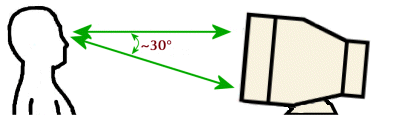
There are several competing schools of thought on this issue, however, we at ErgoCanada recommend that the top of the viewable screen of your monitor should be at the same approximate height as your eyes. Since most of the time you are focused in the middle of your monitor, you will be looking slightly downward at a 10° - 15° angle, on average. And the monitor should be slightly tilted back (about 10° - 15°) so that when you are looking at the center of the screen your line of sight is perpendicular to the surface of the screen. At the very most the bottom of the viewable area of your monitor should never be more than 25° - 30° below your line of sight.
Why not set up my monitor at a lower height?
The biggest problem with locating the monitor at a lower elevation is that it will result in your eyes looking downward. When you look down, even slightly, your head will have an automatic tendency to tilt downward, putting strain on the neck muscles. If you maintain that position, over time you will start bend your entire body over and lean forward subconsciously to relieve the tension on your neck. This will put you in a poor posture which can lead to increased strain on other parts of your body (a back support on a chair can't help you if you are leaning forward in your chair).
A normal relaxed position for your head is anywhere from completely vertical to as much as 10° looking downward - any 'tilt' larger than that can lead to the issues noted above. While you may have a tendency to start leaning forward when looking as the taskbar at the bottom of the screen, that will correct itself when you need to target on a menu at the top of the screen if your monitor is at the correct height. However, when even the top of the viewable area is below your 'straight ahead' viewing angle there is nothing to correct the subconcious tendency to curl into a 'hunched' position which is anything but ergonomic.
What about bifocals?
Bifocals can significantly affect how your monitor should be positioned. If only the lower portion of your glasses will allow you to see the monitor in focus, then obviously the monitor should be located at a height that will allow you to maintain your head at a comfortable vertical position which does not go beyond 90° (i.e. bending your head back). This will likely mean placing the monitor at a lower elevation than for someone with contacts or normal vision. An excellent option is to put an LCD monitor on an articulating arm and adjust it at a 45° angle so that the bottom of the monitor is just above the keyboard (likely hanging slightly over the front edge of the desk). Arms such as IOP's Deluxe LCD Monitor Mount with Internal Cable Management will permit this type of adjustment.
What about the example I always hear about "Hold a piece of paper and read it - you don't hold it up at eye level, do you?"
This argument is flawed on several fronts. The reason we read a piece of paper in a low position is that our arms are not designed to maintain an extended position for any period of time at or near shoulder height - lactic acid starts to build up almost immediately when arms are extended. It is more comfortable to hold any object with arms relaxed at our sides and bent at the elbow. When viewing a monitor, the arms are not involved, so the comparison is inappropriate at best.
In general humans act and react to our environment from a vertical position walking on two legs and sitting in an upright position. Our hunting ancestors and modern day human pedestrians as a rule default to scanning the horizon to make sure that they are safe. We only occasionally glance down to avoid tripping on objects - and with those occasional glances our vision and attention returns to the horizon. In other words our eyes are designed to be used at the orientation of looking straight ahead as opposed to looking down 30° to 45°.
How do I raise (lower) my monitor to the correct height?
Raising a monitor is quite simple - old phone books, stacks of paper, anything sturdy can be used to elevate a monitor. Using monitor risers (such as the VuRyte line of monitor risers) will allow you to utilize the space under your monitor for storage, and ensure a firm elevated platform which won't make your IT department nervous about a monitor being on something potentially unstable. If you have a multi-user workstation, an easily adjustable LCD monitor arm such as IOP's Deluxe LCD Monitor Mount with Internal Cable Management is an option to provide a range of adjustability from mounting point to 18" above the worksurface.
If you need to lower your monitor, that can be more difficult - apart from creating a 'cutout' in your desktop, the only other option is to replace your desk or raise yourself (but then you need to raise your chair, provide proper foot support, raise the keyboarding/mousing surface, etc.).
How far away should my my monitor be relative to my eyes?
This depends on an individuals visual capabilities, a good rule of thumb is you should be a minimum distance equal to the diagonal monitor width (i.e. for a 20" monitor, your eyes should be at least 20" away from the monitor). If you find yourself squinting or leaning forward, and you are at the correct distance, have an eye exam performed. If you are using the appropriate corrective lenses and are still finding difficulty in seeing the screen, consider reducing the resolution on your display.
Make sure to locate the monitor directly in front of you i.e. you shouldn't have to turn in your chair (or at your neck) to see your monitor when you are working on your keyboard and mouse.
What display resolution (pixel size) should I use on my monitor?
Resolution is how many dots (or pixels) are displayed on the screen and expressed as horizontal by vertical i.e. 800 x 600. The term 'display resolution' is somewhat inaccurate as when you change the 'resolution' on any given monitor you are essentially changing the size of the pixels. People who are having trouble working on their computer after positioning it at the correct distance and ensuring they have appropriate corrective lenses on should reduce the display resolution (i.e. increase the pixel size) which enlarges all the content on the screen.
The table below shows the normal display resolution used with each size of monitor; note that most monitors can display in many different resolutions (including wide screen resolutions which are not shown in the table below) i.e. a standard 19" monitor will usually offer 640x480, 800x600 (recommended in most cases), 960x600 (widescreen version of 800x600), 1024x768, 1152x864, 1280x768 (widescreen version of 800x600), 1280x1024.
| Name | Horizontal Pixels | Vertical Pixels | Monitor Usage |
| VGA | 640 | 480 | 17" |
| SVGA | 800 | 600 | 19" |
| XGA | 1024 | 768 | 20"-21" |
| SXGA | 1280 | 1024 | 22"-23" |
| UGA | 1600 | 1200 | 24" |
| QXGA | 2048 | 1536 | 25"+ |
ErgoCanada.com's Guide to Ergonomics is a work in progress. If you have any comments on our existing content or additional material which we could add, please let us know!
We hope you found this general information helpful - for more specific information for your unique situation, we recommend getting an assessment by an ergonomic professional.
Please bookmark this site and check back often, as we are adding new products and services regularly.

Ergonomics Portal: ErgoCanada.com
P.O. Box 9022 Saskatoon, SK, Canada S7K 7E7
Phone: (306) 382-5995 Fax: (306) 382-4995
Toll-Free: (866) 335-3746 (ERGO)
Email: sales@ergocanada.com
Check out our other portals:
ExtremeGamingDevices.com
- Specialty gaming products for extreme gamers
ErgoLaptop.com - Ergonomic products
for laptop users.
BirdxCanada.com - Bird control products
All materials copyright © 2008 Micwil Group of Companies Ltd.