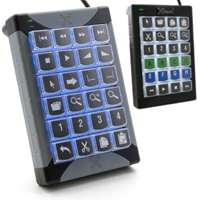
X-keys XK-24 is a user-programmable keypad which becomes a custom input solution able to meet the specific needs of any indivual or application. The XK-24 provides the ability to eliminate repetitive multiple or combination keystrokes by mapping them ...
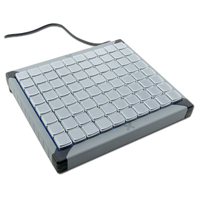
X-keys XK-24 is a user-programmable keypad which becomes a custom input solution able to meet the specific needs of any indivual or application. The XK-24 provides the ability to eliminate repetitive multiple or combination keystrokes by mapping them to a single keystroke. This keypad can be programmed in 2 distinct layers with 46 programmable functions and serve as addition or substitution to the standard USB keyboard. This device can send keystrokes to any operating system or application which recognizes a USB keyboard. The X-keys XK-24 has internal memory which facilitates programming of the keypad on one computer and retention of that programming, so that the custom layout is recognized as plug and play on other computers. Clear key lenses keep printed or handwritten legends securely in place and protect them from wear while making it quick and easy to update them. Red and blue backlighting with adjustable intensity and detachable feet improve the visibility and viewing angle of the key legends.
The Free MacroWorks 3 (MW3) Software for Windows provides simple programming for launching applications, opening files or accessing directories. It also facilitates the insertion of special characters, foreign language letters and symbols as Unicode text strings which can then be assigned to any key. PI Engineering's new PI3 firmware offers new capabilities to the developer including flash updates, a joystick / mouse emulation and the newly developed Reflector Mode. Reflector Mode allows the developer to send outbound messages to the X-keys which can be reflected back to the Operating System in keyboard, mouse or joystick data stream. Mac operators also have multiple programming options or can have the device pre-programmed on a Windows PC using the MacroWorks 3 software.
Models
Model #
Description
Price
In Stock?
Buy Now
XK-24
X-keys XK-24 Programmable Keypad
$225.00
Yes
XK-1483-UABK24-R
X-keys XK-24 Programmable Keypad, Black Housing, White Backlighting
$240.00
Yes
Accessories
Model #
Description
Price
In Stock?
Buy Now
XK-A-556-R
P.I. Engineering X-Keys Key Blocker Accessory Kit, set of 10 individual key blockers, Black
$13.50
Yes
XK-A-529-R
P.I. Engineering X-Keys Tall (2x1) Transparent Keycap Accessory Kit, set of 10 Tall keycaps, Clear
$17.50
Yes
XK-A-528-R
P.I. Engineering X-Keys Wide (1x2) Transparent Keycap Accessory Kit, set of 10 Wide keycaps, Clear SPECIAL ORDER ONLY.
$17.50
No
XK-A-548-R
P.I. Engineering X-Keys Set of 10 Transparent Single Keycaps, no Legends, 1 x 1 SPECIAL ORDER ONLY.
$13.50
No
XK-A-1139
P.I. Engineering X-Keys Single Blank Stickless Legend Sheets (10-pack), 7 x 12 grid (84 keycaps total)
$15.00
Yes
XK-A-1141
P.I. Engineering X-Keys Wide Blank Stickless Legend Sheets (10-pack), 6 x 6 grid (36 keycaps total) NO ETA.
$15.00
No
XK-A-1142
P.I. Engineering X-Keys Tall Blank Stickless Legend Sheets (10-pack), 12 x 3 grid (36 keycaps total) SPECIAL ORDER ONLY.
$15.00
No
XK-A-1143
P.I. Engineering X-Keys Quad Blank Stickless Legend Sheets (10-pack), 6 x 3 grid (18 keycaps total) NO ETA.
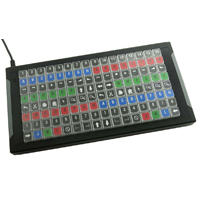
The X-keys XKE-128 USB Keyboard from PI Engineering is an easily customizable programmable keyboard with eight rows and sixteen columns (128 keys total) for building whatever keyboard layout a user needs, including a switching controller for vMix, Ne ...
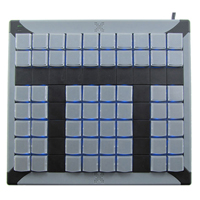
The X-keys XKE-128 USB Keyboard from PI Engineering is an easily customizable programmable keyboard with eight rows and sixteen columns (128 keys total) for building whatever keyboard layout a user needs, including a switching controller for vMix, Newtek Tricaster, or other popular streaming software. Like similar X-keys products, the XKE-128 model has addressable blue and red backlighting for each key, connects to a computer via a USB connection, and is provided with an SDK for software developers for greater customization and integration with existing hardware. It is also housed in a heavy extruded aluminum case with powder coated finish for added durability.
For those who want to use the XKE-128 mainly as a switching controller, PI Engineering also offers a Video Switcher Kit for vMix, Newtek Tricaster, and other streaming software, so that any user can quickly create their layout of choice. This set is a great complement to the XKE-128 as well as the XKE-124 T-Bar Keyboard.
Models
Model #
Description
Price
In Stock?
Buy Now
XK-1225-UFK128-R
PI Engineering X-keys XKE-128 USB Keyboard NO 30 DAY CSG. SPECIAL ORDER ONLY.
$780.00
No
Accessories
Model #
Description
Price
In Stock?
Buy Now
XK-A-1456-R
PI Engineering Video Switcher Key Set Accessory Kit NO 30 DAY CSG. SPECIAL ORDER ONLY.
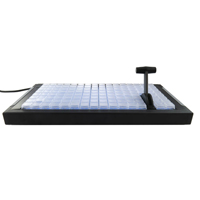
The X-keys XKE-124 T-Bar USB Keyboard from PI Engineering is an easily customizable programmable keyboard with 124 keys and an embedded T-Bar fader for building whatever keyboard layout a user needs, including a switching controller for vMix, Newtek ...
The X-keys XKE-124 T-Bar USB Keyboard from PI Engineering is an easily customizable programmable keyboard with 124 keys and an embedded T-Bar fader for building whatever keyboard layout a user needs, including a switching controller for vMix, Newtek Tricaster, or other popular streaming software. Like similar X-keys products, the XKE-124 T-Bar model has addressable blue and red backlighting for each key, connects to a computer via a USB connection, and is provided with an SDK for software developers for greater customization and integration with existing hardware. It is also housed in a heavy extruded aluminum case with powder coated finish for added durability. The embedded T-Bar fader is smooth, solid, and reports 0 - 255 linear position values.
For those who wish to use the XKE-124 T-Bar mainly as a switching controller, PI Engineering also offers a Video Switcher Kit for vMix, Newtek Tricaster, and other streaming software, so that anyone can quickly create their layout of choice. This set is a great complement to the XKE-124 T-Bar as well as the XKE-128 Keyboard.
Models
Model #
Description
Price
In Stock?
Buy Now
XK-1370-UFB124-R
PI Engineering X-keys XKE-124 T-Bar USB Keyboard NO 30 DAY CSG. SPECIAL ORDER ONLY.
$1165.00
No
Accessories
Model #
Description
Price
In Stock?
Buy Now
XK-A-1456-R
PI Engineering Video Switcher Key Set Accessory Kit NO 30 DAY CSG. SPECIAL ORDER ONLY.
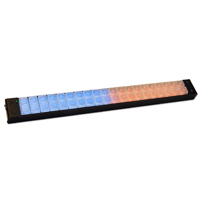
The X-keys XKE-40 Stick is a USB HID class device that uses the latest MacroWorks 3.1 software and standard Xkeys functions to provide easily customizable layouts, programming options, and legending for whatever features required in a compact format. ...
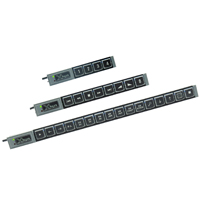
The X-keys XKE-40 Stick is a USB HID class device that uses the latest MacroWorks 3.1 software and standard Xkeys functions to provide easily customizable layouts, programming options, and legending for whatever features required in a compact format. This unit has 40 relegendable single keys in an extruded metal casing, blue and red backlighting for each addressable key, USB connection to PC or Mac, and free Software Development Kits for Windows, OS X, Linux, Android, and raw HID.
This device can send keystrokes to any operating system or application which recognizes a USB keyboard. The X-keys XKE-40 Stick has internal memory which allows a user to program the Stick on one computer and retain that programming, so that the custom layout is recognized as Plug and Play on other computers. Clear key lenses keep printed or hand written legends securely in place and protect them from wear while making it quick and easy to update them. Red and blue backlighting with adjustable intensity and detachable feet under the housing improve the visibility and viewing angle of the key legends.
MacroWorks 3.1 (MW3) Software provides simple programming for launching applications, opening files or accessing directories. It allows the user to insert special characters, foreign language letters and symbols as Unicode text strings which can then be assigned to any key. PI Engineering's new PI3 firmware offers new capabilities to the developer including flash updates, a joystick/mouse emulation and the newly developed Reflector Mode. Reflector Mode allows the developer to send outbound messages to the X-keys which can be reflected back to the Operating System in keyboard, mouse or joystick data stream.
Note: The XKE-40 is designed to sit on a flat surface and can be angled at 45° using the included feet to provide better viewing.
The X-keys XK-16 (XK-8 or XK-4) Stick is a USB HID class device that uses the latest MacroWorks 3.1 software and standard Xkeys functions to provide easily customizable layouts, programming options, and legending for whatever features required in a c ...
The X-keys XK-16 (XK-8 or XK-4) Stick is a USB HID class device that uses the latest MacroWorks 3.1 software and standard Xkeys functions to provide easily customizable layouts, programming options, and legending for whatever features required in a compact, "stick"' format. This unit has 16 (8 or 4) relegendable keys, blue backlighting for each addressable key, hardware mode supporting keyboard, mouse, and joystick emulation, and more. There is also now a Linux Software Development Kit for programmers.
This device can send keystrokes to any operating system or application which recognizes a USB keyboard. X-keys Sticks have internal memory which allows a user to program the Stick on one computer and retain that programming, so that the custom layout is recognized as Plug and Play on other computers. Clear key lenses keep printed or hand written legends securely in place and protect them from wear while making it quick and easy to update them. Red and blue backlighting with adjustable intensity and detachable feet under the housing improve the visibility and viewing angle of the key legends.
MacroWorks 3.1 (MW3) Software provides simple programming for launching applications, opening files or accessing directories. It allows the user to insert special characters, foreign language letters and symbols as Unicode text strings which can then be assigned to any key. PI Engineering's new PI3 firmware offers new capabilities to the developer including flash updates, a joystick / mouse emulation and the newly developed Reflector Mode. Reflector Mode allows the developer to send outbound messages to the X-keys which can be reflected back to the Operating System in keyboard, mouse or joystick data stream.
The XK-60 Programmable Keypad uses the latest MacroWorks 3.1 software and standard Xkeys functions to yield easily customizable layouts, programming options, and legending for whatever features required. This unit has 60 relegendable keys, blue and r ...
The XK-60 Programmable Keypad uses the latest MacroWorks 3.1 software and standard Xkeys functions to yield easily customizable layouts, programming options, and legending for whatever features required. This unit has 60 relegendable keys, blue and red backlighting for each addressable key, hardware mode supporting keyboard, mouse, and joystick emulation, and more.
This device can send keystrokes to any operating system or application which recognizes a USB keyboard. X-keys XK-60 has internal memory which allows a user to program the keypad on one computer and retain that programming, so that the custom layout is recognized as Plug and Play on other computers. Clear key lenses keep printed or hand written legends securely in place and protect them from wear while making it quick and easy to update them. Red and blue backlighting with adjustable intensity and detachable feet under the housing improve the visibility and viewing angle of the key legends.
MacroWorks 3.1 (MW3) Software provides simple programming for launching applications, opening files or accessing directories. It allows the user to insert special characters, foreign language letters and symbols as Unicode text strings which can then be assigned to any key. PI Engineering's new PI3 firmware offers new capabilities to the developer including flash updates, a joystick / mouse emulation and the newly developed Reflector Mode. Reflector Mode allows the developer to send outbound messages to the X-keys which can be reflected back to the Operating System in keyboard, mouse or joystick data stream.
Note: This model is identical to the XK-80 model but has 20 key blockers permanently installed.
Models
Model #
Description
Price
In Stock?
Buy Now
XK-0979-UBK60
XK-60 Programmable Keypad, USB
$325.00
Yes
Accessories
Model #
Description
Price
In Stock?
Buy Now
XK-A-556-R
P.I. Engineering X-Keys Key Blocker Accessory Kit, set of 10 individual key blockers, Black
The XK-80 Programmable Keyboard uses the latest MacroWorks 3.1 software and standard Xkeys functions to yield easily customizable layouts, programming options, and legending for whatever features required. This unit has 80 relegendable keys, blue and ...
The XK-80 Programmable Keyboard uses the latest MacroWorks 3.1 software and standard Xkeys functions to yield easily customizable layouts, programming options, and legending for whatever features required. This unit has 80 relegendable keys, blue and red backlighting for each addressable key, hardware mode supporting keyboard, mouse, and joystick emulation, and more.
This device can send keystrokes to any operating system or application which recognizes a USB keyboard. X-keys XK-80 has internal memory which allows a user to program the Keyboard on one computer and retain that programming, so that the custom layout is recognized as Plug and Play on other computers. Clear key lenses keep printed or hand written legends securely in place and protect them from wear while making it quick and easy to update them. Red and blue backlighting with adjustable intensity and detachable feet under the housing improve the visibility and viewing angle of the key legends.
MacroWorks 3.1 (MW3) Software provides simple programming for launching applications, opening files or accessing directories. It allows the user to insert special characters, foreign language letters and symbols as Unicode text strings which can then be assigned to any key. PI Engineering's new PI3 firmware offers new capabilities to the developer including flash updates, a joystick / mouse emulation and the newly developed Reflector Mode. Reflector Mode allows the developer to send outbound messages to the X-keys which can be reflected back to the Operating System in keyboard, mouse or joystick data stream.
Note: This model is identical to the XK-60 model but does not have 20 key blockers permanently installed.
Models
Model #
Description
Price
In Stock?
Buy Now
XK-0980-UBK80
XK-80 Programmable Keyboard, USB
$385.00
Yes
Accessories
Model #
Description
Price
In Stock?
Buy Now
XK-A-556-R
P.I. Engineering X-Keys Key Blocker Accessory Kit, set of 10 individual key blockers, Black
The X-Keys L-Trac Black Trackball from PI Engineering combines a high level optical sensor capable of resolutions up to 1600 CPI (counts per inch) with a robust build and history of durability, reliability and performance, carrying on the legacy of t ...
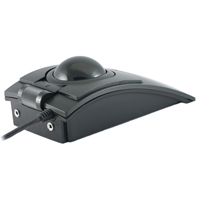
The X-Keys L-Trac Black Trackball from PI Engineering combines a high level optical sensor capable of resolutions up to 1600 CPI (counts per inch) with a robust build and history of durability, reliability and performance, carrying on the legacy of the L-Trac and PC-Trac Trackballs formerly manufactured by Clearly Superior Technologies. The L-Trac features an optical laser sensor that offers "button selectable" tracking resolutions of 400, 800 and 1600 CPI, easily changed on the fly. Combined with this is the ability of the L-Trac to track at speeds exceeding 30 inches per second, even at a 20G acceleration rate. A wide light touch scroll wheel or cylinder is readily accessible, located above the center button. In addition, two 3.5 mm jacks permit the attachment of two external switches which can be programmed to perform an additional two actions, resulting in full 5-button functionality. The programming software can also be used to disable or reassign any or all of the on-board buttons when used with external switches in an assistive application.
The L-Trac provides users with a precision, high performance pointing device. The large 57 mm diameter weighted trackball produces predictable, quick, and precise cursor control. Most users will find that movement becomes intuitive within a few minutes of use, with the level of control increasing over time.
The level of performance and range of features, coupled with the proven contour of the L-Trac makes these trackballs an appropriate option for all applications including general computing, gaming and Computer Aided Design (CAD). CAD users love it because a line can be dragged one pixel even on high resolution displays. Then, with a button stroke, the cursor can fly around the screen to get general tasks done. The L-Trac is known for providing fingertip control and precision, high performance tracking.
Designed to minimize the effects of contamination build up and the resultant degradation of performance, this high performance laser trackball uses highly polished stainless steel rollers. These rollers tend to collect less dirt and debris than the mechanisms used in most other trackballs and are easily cleaned by spinning the ball rapidly.
Models
Model #
Description
Price
In Stock?
Buy Now
TKB-6015-LBKBK-R
X-Keys L-Trac Black Trackball, Laser Optical Tracking, Black Case and Ball, 3 Buttons plus 2 jacks for external switches, Scroll Wheel.
The X-Keys USB 12 Switch Interface from PI Engineering is the ideal solution where a high number of commands, complex macros or long strings of data need to be entered by a single action. Equipped with 6 input ports this interface can accommodate up ...
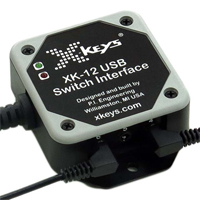
The X-Keys USB 12 Switch Interface from PI Engineering is the ideal solution where a high number of commands, complex macros or long strings of data need to be entered by a single action. Equipped with 6 input ports this interface can accommodate up to 12 switches with the use of optional splitter cables. With the ability to accept input from switches located up to 1000 feet from the interface module this can be used to activate commands from multiple remote locations, such as in interactive kiosks at museums. The interface memory can retain approximately 1000 keystrokes or commands and is easily reprogrammed using free software for PC, MAC or Android systems.
Models
Model #
Description
Price
In Stock?
Buy Now
XK-1202-UHS12-R
XKeys USB Switch Interface
$167.50
Yes
Accessories
Model #
Description
Price
In Stock?
Buy Now
XK-A-1182-35Y-R
PI Engineering Left-Right Splitter, (turns one port on the X-keys USB 12 Switch Interface into two ports.)
The XK-3 Triple Action Foot Pedal from PI Engineering is a practical method of reducing the risk of finger strain often associated with heavy computer usage. The XK-3 Pedal transfers repetitive actions such as mouse-clicks or common keyboard shortcut ...
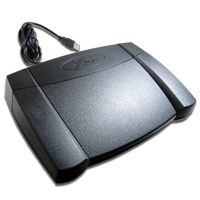
The XK-3 Triple Action Foot Pedal from PI Engineering is a practical method of reducing the risk of finger strain often associated with heavy computer usage. The XK-3 Pedal transfers repetitive actions such as mouse-clicks or common keyboard shortcuts (Copy [Ctrl+C], Paste [Ctrl+V], Save [Ctrl+S]) to the feet. Programming modifier-keys (such as Shift, Ctrl, or Alt) can also help to maximize productivity by allowing the user to continue typing without interruption, quickly accessing modifiers with the feet. In addition, common repetitive content or complex macro sequences can be programmed for quick and accurate entry as needed. Users such as transcriptionists can easily program the pedals to perform their most common commands, freeing them to maintain focus on their work.
The XK-3 X-Keys Triple Action Foot Pedal features a modern smooth appearance and is available in two distinct styles. While visually identical, the 'front hinged' and 'rear hinged' models are distinguished by the location of the hinge on the large centre pedal. The two outer "piano-key" pedals are always rear hinged and offer two additional discrete actions.
The XK-3 front-hinged model is well-suited for applications where activation is "momentary", such as activating mouse clicks, modifier keys, and macros. The front-hinge design allows the foot to rest on the centre pedal during periods of inactivity instead of being forced to 'hover' or remove their foot from the pedal.
For functions where continuous activation serves the task (transcription playback for example), the XK-3 rear-hinged model is more suitable. The rear-hinged design allows the foot to be in a resting position while the centre pedal is depressed.
The XK-3 Pedal is equipped with easily-activated switches guaranteed for over one million activations. Activation is audible but very quiet, barely noticeable in most office environments. Users can also connect multiple XK-3 Pedals for enhanced productivity.
The XK-3 Triple Action Foot Pedal is easily programmed within either Windows or Mac environments using downloadable software. Advanced programmers may wish to take advantage of the free Software Development Kits (SDK) for Windows, Linux, Android, or Raw HID.