| | | Product Summary |
|---|
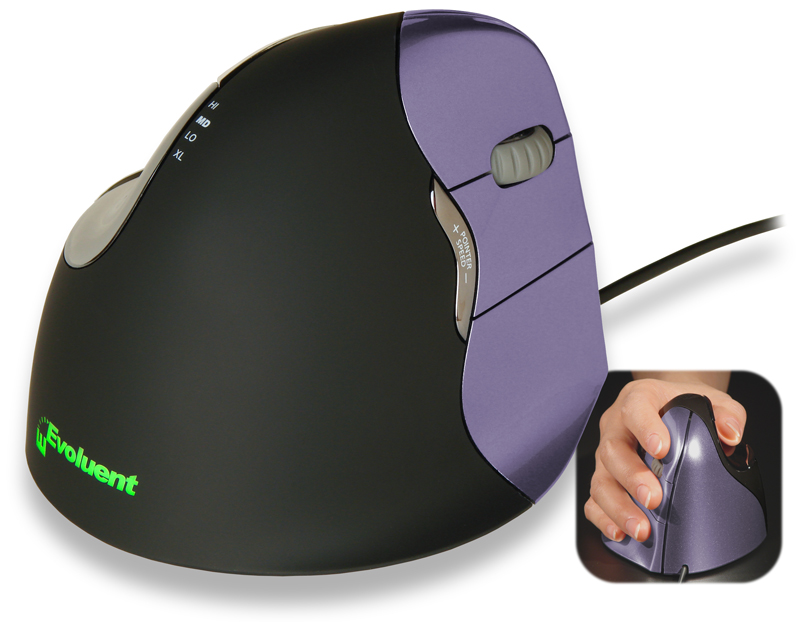
The VerticalMouse 4 Small from Evoluent features a unique patented contoured design that transforms the traditional palm down mousing position into a vertical handshake position. This "vertical" position is designed to reduce stress in the forearm and elbow and offers increased comfort for many individuals. The flange along the bottom of the mouse prevents the fifth finger from dragging on the desk and a uniquely sculpted thumb rest provides not only a relaxed resting place for the thumb but also a means for enhanced control of the mouse.
Performance based features include an easy-to-access pointer speed button on the side of the mouse. This offers settings of Extra Low, Low, Medium and High, allowing the appropriate acceleration and degree of precision to be selected for each task.
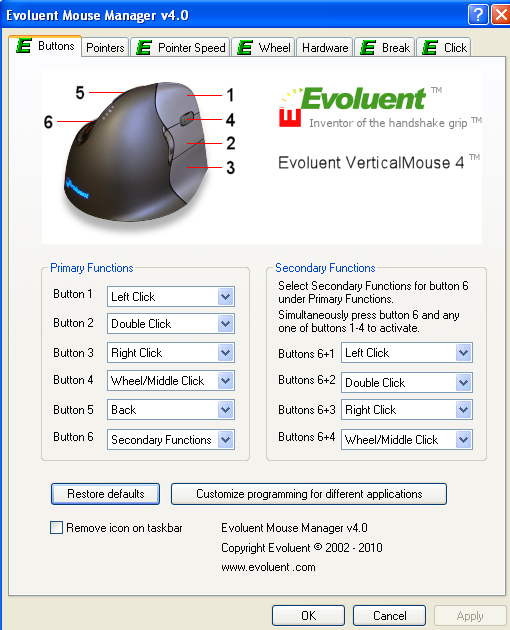
The MouseManager Software from Evoluent provides options for customization of the VerticalMouse to meet anyone's specific requirements. Any of the 6 buttons can be assigned custom commands. The driver also includes additional enhancements such as instant access to screen brightness adjustment via the scroll wheel, auto-click, and drag lock.
EXCEL USERS: Tired of not being able to scroll horizontally? The MouseManager Software offers a "Horizontal Scroll" function that facilitates effortless switching between Vertical and Horizontal scrolling in EXCEL.
The Evoluent VerticalMouse 4 Small comes in a black housing with purple buttons and is available for right-handed use only. This mouse is also available in a Wireless model.
Choose the Correct Size:
Selecting a mouse that best matches hand size is important when addressing ergonomic issues. This printable Sizing Guide can be used to determine whether a SMALL or STANDARD size Evoluent VerticalMouse 4 is the appropriate size.
If it is determined that handsize exceeds the measurements for the Small the Evoluent VerticalMouse4 is also available as a Standard size in Wireless, Wired, and Bluetooth (for Mac).
Those with large hands and/or long fingers may also be interested in the Evoluent VerticalMouse C or the Evoluent VerticalMouse C Wireless, or may want to consider the Large size of the VerticalMouse D. This latest addition to the Evoluent family is available in Small, Medium and Large sizes for right-handed individuals, in both Wired and Wireless.
View the entire range of Evoluent models. | | Ergonomic Benefits |
|---|
Comfortable and Easy to Use - The VerticalMouse 4 is optimally sculpted to yield uncompromising comfort and easy-to-reach programmable buttons, eliminating finger stretching and contortions.
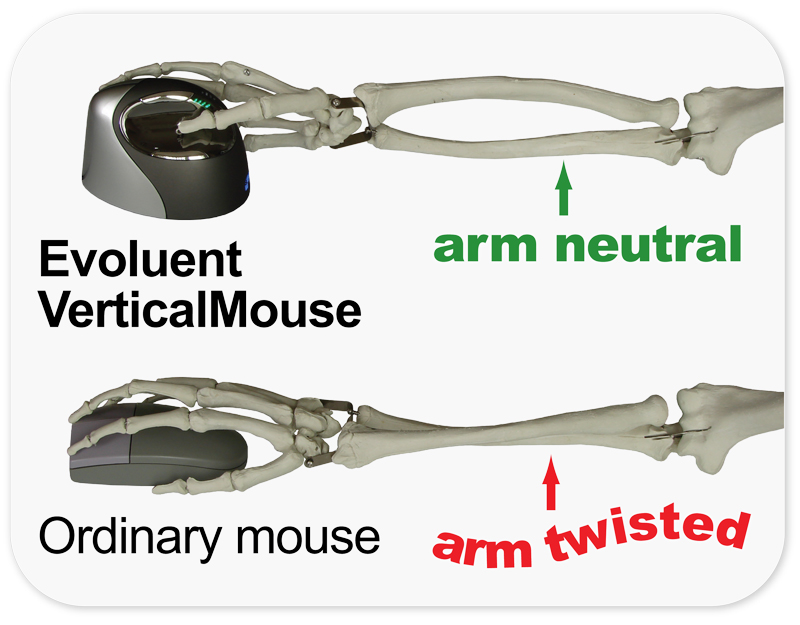
Maintains Blood Flow through the Wrist - Conventional horizontal mice cause the forearm to twist away from its natural position, which can reduce blood flow, contort muscles into awkward positions and increase the rate of fatigue. For many, this can result in discomfort and pain while mousing. The Evoluent VerticalMouse lets the hand and forearm maintain an almost vertical alignment that eliminates the unnatural twisting and associated issues.
Eliminates Forearm Pronation - The design of the Evoluent VerticalMouse improves comfort and control when mousing, with a patented shape that supports the hand in a relaxed handshake position, and a sculpted “notch” in which to rest the thumb. This innovative design eliminates forearm twisting and minimizes the effort required to use the mouse. Learn More About Pronation.
Can Reduce or Eliminate Wrist Extension - Traditional mice require that the hand be in a facedown position on the mouse. Most tend to plant the heel of their hand on the mousing surface and then attempt to move the mouse with the thumb and pinkie or ring fingers. This puts the wrist into a position of extension which can lead to painful RSI. The Evoluent VerticalMouse addresses this by rotating the hand away from the desk, eliminating the tendency to "plant" the hand. While it is still possible to create some wrist extension by flexing the wrist for left/right movements this can also be easily addressed by learning to move the Evoluent VerticalMouse with the arm rather than the hand. Learn More About Wrist Extension.
Can Address Tennis Elbow (Lateral Epicondylitis) - The vertical orientation into which the Evoluent VerticalMouse rotates the hand is intended to address excessive tension exerted upon the tendons and tissue of the forearm. This occurs when the hand is rotated into the palm down position common in both mousing and keyboarding. This tension is known to commonly manifest in what is usually referred to as "tennis elbow", when inflammation develops where the tendon attaches to the outer edge of the elbow. Eliminating the tension by addressing the pronation issue permits the tendon to relax and as the attachment point is no longer under continuous stress the tissue is permitted to rest and heal. Learn More About Lateral Epicondylitis.
Reduces Potential for “Anticipation of the Click” and Eliminates Finger Extension - The ergonomic design and low click force of the Evoluent encourages individuals to let their fingers remain "at rest" against the buttons, rather than hovering over them in anticipation of clicking. Since the fingers can relax against the mouse there is no hovering or stretching action of the fingers which can lead to development of Trigger Finger. Learn More About Trigger Finger.
Almost No Learning Curve - Because the same familiar handhold adopted when using an ordinary mouse is used - just turned sideways, and the buttons operated by the same fingers, the need to retrain or establish new muscle memory is virtually eliminated.
Cursor Stability - Because the thumb is positioned to naturally oppose the finger movements the Evoluent VerticalMouse does not unintentionally move sideways when clicking with normal force. Many will probably adapt to this immediately while for others it may take some time while their thumb learns what degree of counterforce is required.
Pointer Accuracy - Pointer control is as accurate as any other high-quality performance mouse. The high quality sensor offers four speed settings that can be accessed on-the-fly for optimum performance.
Encourages Load Balancing or Spreading with Software Option - Mouse Manager (Microsoft Certified) for Windows offers extensive custom, and even contextual (program specific), programming options yet is still easy to use through a simple and intuitive interface. There is also the option of reassigning button commands for load balancing or duplicating commands on multiple buttons in order to spread the load across multiple digits. The Mouse Manager software is also available for MAC OSX (See the Technical Specifications).
Offers Alternative Clicking Options to Reduce Repetition - In order to reduce repetitive clicking the Mouse Manager software can be set to automatically perform a single or double click by pausing the pointer. The time delay before activation is adjustable. Or it is also possible to reassign commands to a different button or multiple bottoms to lighten or spread the clicking.
Provides Alternatives to Static Strain For Click-Drag Operations - Dragging actions impose static stress on the finger while holding the button down. This can be greatly reduced by using the Evoluent Mouse Manager software. This setting lets one press and hold a button momentarily to simulate continued pressing without holding down the button. The time delay before activation is adjustable. Note: Evoluent Mouse Manager Software required.
Break Reminder Option - In order to discourage overworking of the hands the the Mouse Manager software can be used to set up visual and/or audio alerts as break reminders. Note: Evoluent Mouse Manager Software required.
| | Features |
|---|
- Adjustable Laser Sensor: Pointer speed buttons on the side allow convenient adjustment without even changing hand position on the mouse.
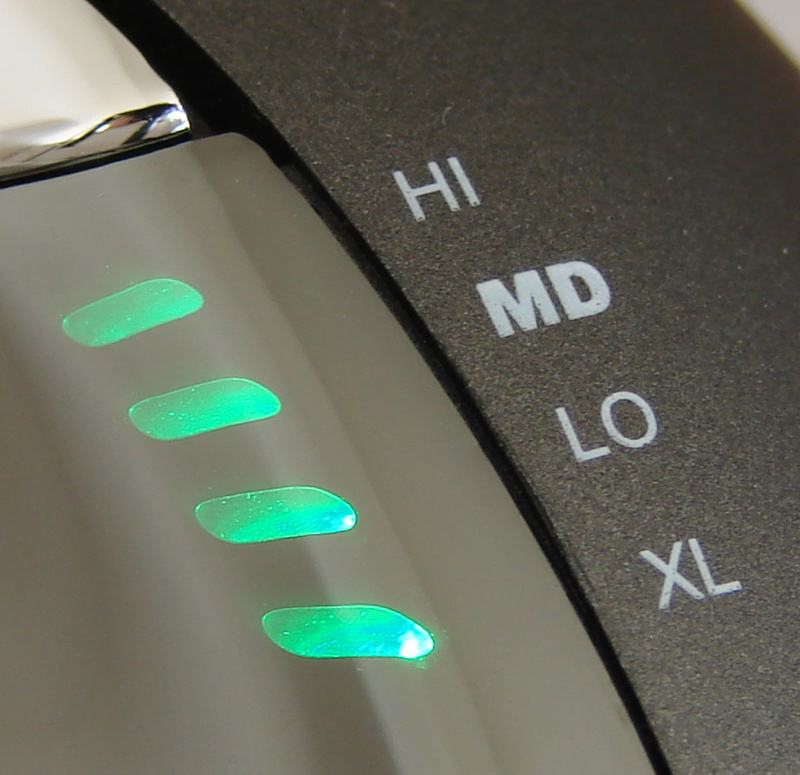
- Pointer Speed Indicators: Top mounted LED-illuminated indicators show through the housing on the chrome thumb rest to advise of the current pointer speed.
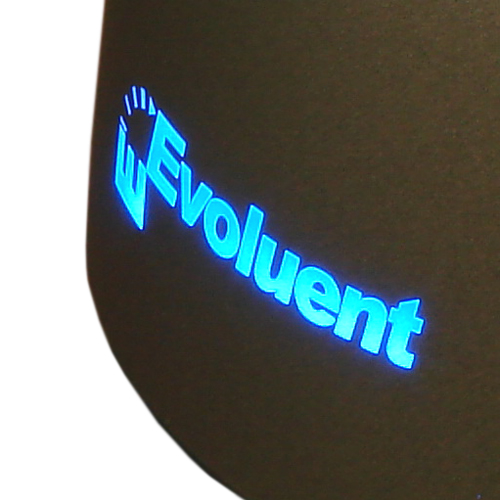
- Back-Lit Evoluent Logo: A purely cosmetic feature which adds to the lustre and modern look of this mouse. The illumination turns off when the system is in sleep mode to conserve power.
- Useful and Intuitive Driver: Mouse Manager for Windows offers extensive custom and contextual (program specific) programming options yet is still easy to use through a simple and intuitive interface. In addition, pre-programmed button assignments are available for many popular applications. The Mouse Manager software is also available for MAC OSX with a slightly limited range of options.
- Shape: Improved softer contouring makes for a more comfortable fit. This Small version of the Evoluent VerticalMouse 4 is designed to provide comfort for those with smaller hands. The smaller dimensions combine with a deeper and slightly angled indentation for the thumb to eliminate or reduce the pressure in the web of the hand which those with smaller hands can encounter when attempting to use the Standard size Evoluent VerticalMouse 4.
- Scroll Wheel: Grooved soft rubber with tactile detents. The Scroll Wheel is also "clickable" and provides a "forward" command by default. This command can also be customized using the Evoluent Mouse Manager Software.
- Finger Flange: The large finger flange prevents the fifth finger from dragging on desk.
- Speed Toggle: Move up or down through the 4 pointer speed settings with the easy-to-access side button and clearly visible illuminated indicators.
- Application Dependent Buttons: Customized button programming that automatically takes effect depending on which application is active is also possible. Note: Installation of the Evoluent Mouse Manager is required for any custom programming.
- Quality Ergonomic Design: The Evoluent VerticalMouse 4 is engineered with a high quality sensor coupled with the low button activation force for which all models of the Evoluent VerticalMouse are known. Button action and vertical scroll wheel movement is smooth, consistent and precise. Improved contours provide greater comfort and a more relaxed grip.
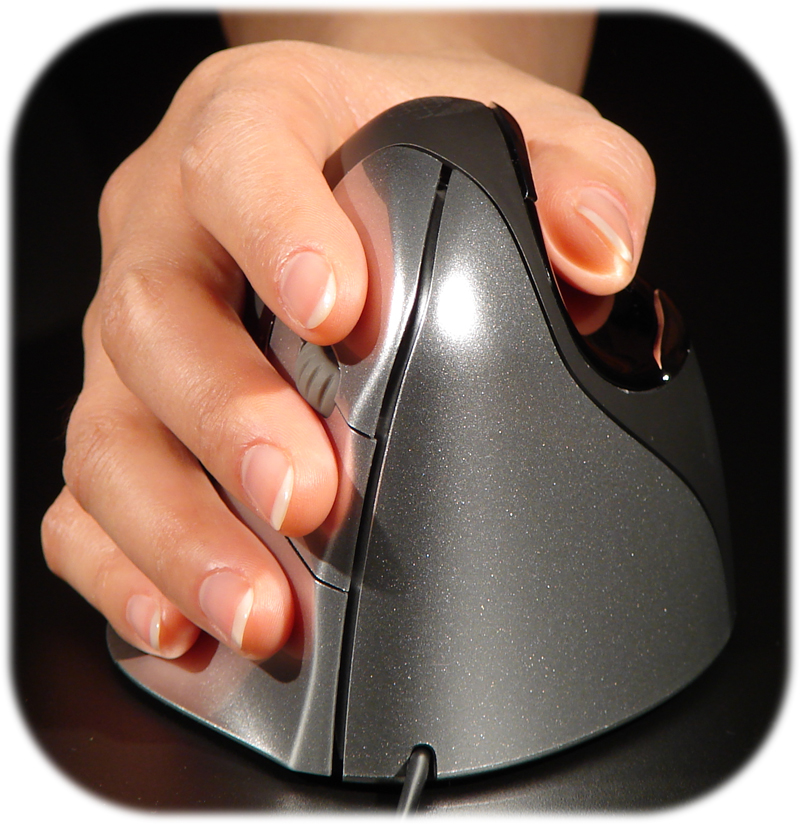
- Relaxed Handshake Position: The ergonomic contoured shape of the Evoluent VerticalMouse 4 supports the hand in a natural handshake position that eliminates forearm twisting. Finger positions are similar to a traditional "flat" mouse, but rather in a vertical orientation, so almost no retraining is needed. Clicking the mouse buttons does not result in unwanted movement because the thumb naturally opposes other finger movements.
- Contoured and Textured: The contoured black portion of the mouse has a polyurethane coating, allowing complete control by simply resting the hand on it—practically eliminating any need to "grip" the mouse.
- Light Force Tactile Buttons: The buttons on the VerticalMouse 4 are designed for easy activation. The button force is low for easy clicking and to reduce the strain on the fingers, but still retains sufficient tactile firmness to avoid accidental actuation.
- Six Buttons: The Evoluent VerticalMouse 4 provides a total of 6 buttons. Two thumb operated buttons and 3 finger operated buttons are provided, with the scroll wheel providing a sixth button.
- Auto Click Option: With the Evoluent Mouse Manager software installed it is possible to automatically perform a single or double click by simply pausing the pointer. The time delay before activation is adjustable. Note: Evoluent Mouse Manager Software required.
- Click Lock (or Drag Lock): This function, available through the Evoluent Mouse Manager Software, can eliminate the ongoing tension the index finger is subjected to when performing dragging operations. Rather than having to press and hold the mouse button while dragging, the software lets one press and hold a button momentarily to engage the "locking" function. When the movement is completed the lock is released by pressing any button on the mouse. In order to avoid accidental activation of this feature the time delay before activation is adjustable. Note: Evoluent Mouse Manager Software required.
- Break Reminder: The Evoluent Mouse Manager software also lets one set up visual and/or audio alerts as break reminders. Note: Evoluent Mouse Manager Software required.
- EXCEL - HORIZONTAL SCROLL Option: EXCEL USERS: can now switch from vertical to horizontal scroll actions by using the Evoluent Mouse Manager software to assign a "Horizontal Scroll" function to Button #6. Depressing this button while scrolling immediately switches the button from the traditional scrolling to horizontal mode. Scanning through a spreadsheet, both vertically and horizontally is now virtually effortless. To switch back to vertical scroll simply release button #6.
NOTE: This function is currently only available for Windows-based EXCEL
Note: Evoluent Mouse Manager Software required.
| | Images (Click on any thumbnail to view larger image) |
|---|
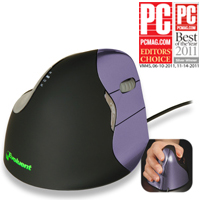
VerticalMouse 4 Small
| 
VerticalMouse Small, Closeup of Speed Toggle LED Indicator
| 
VerticalMouse 4 Small, Hand Orientation
| 
VerticalMouse 4 Small, Closeup of Backlit Evoluent Logo at Back of Mouse
| 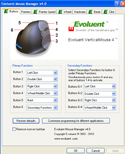
VerticalMouse 4 Small, Driver Screen Capture
| 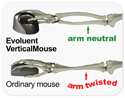
VerticalMouse 4 Small, Ergonomics Behind Vertical Orientation
|
| | Additional Resources |
|---|
- Evoluent Vertical Mouse Sizing Guide: PDF
- EXCEL Horizontal Scroll Function: Video
| | Technical Specifications |
|---|
- Dimensions:
Width: 3.2" (8.1 cm)
Depth: (front to back) | 4.1" (10.5 cm)
Height: 3.0" (7.5 cm
Weight: 125 grams
Cord Length: 82" (2.1 m) - Cable Length: 80" (2 m)
- Laser Resolution: Extra low, low, medium,high
- Compatibility: Current compatibility details can always be found on the Evoluent Support Page.
Basic Plug-and-Play: - Windows XP and newer (all basic functions)
- Mac OS X (basic functions as per OS version support)
- Linux (Fixed button functions without a driver)
Programmable Functionality: - Windows XP and Vista (shareware drivers available - see Evoluent Support Page for further details.
- Windows 7, 8, and 10 (32 & 64 bit) . DownloadMicrosoft Certified Evoluent Mouse Manager.
- Mac OS (varies with OS version). View current compatibility and download Evoluent Mouse Manager for Mac options on the Evoluent Support Page.
- Interface: USB (not compatible withPS/2 adapters or KVMswitches)
- Programmable Functions for Each Button:
- Disabled
- Left Click
- Right Click
- Wheel/Middle Click
- Alt
- Auto Pan
- Back
- Backspace
- Close
- Copy
- Ctrl
- Cut
| - Delete
- Double Click
- Enter
- Esc
- Explorer
- F1
- F2
- F3
- F4
- F5
- F6
- F7
| - F8
- F9
- F10
- F11
- F12
- Forward
- Keystroke Recording
- Launch Application
- Maximize
- Minimize
- Page Down
- Page Up
| - Paste
- Pointer Speed Toggle
- Print Screen
- Run
- Shift
- Show/Hide Desktop
- Spacebar
- Start
- Switch Applications
- Tab
- Undo
- Zoom
|
The lower Thumb button (#6) has several additional programmable functions.- Eye Comfort - to adjust screen brightness on the fly using the Scroll Wheel
- Horizontal Scroll Facilitates fast Horizontal Scrolling in EXCEL Spreadsheets
- Secondary Functions - to provide access to a second layer of commands on the other 5 buttons
- Note on Programmable Functions: If button 6 (bottom thumb button) is programmed as a "Toggle" button, then a second layer of functions can be added to buttons 1, 2, 3, and 4. This allows for up to nine (9) functions to be programmed into the Evoluent VerticalMouse 4. (6 buttons - 1 as toggle + second layer for 4 buttons = 9 functions)
- Default Buttons: For PC:
- Top finger button: Left click
- Middle finger button: Middle click
- Bottom finger button: Right click
- Scroll wheel button: Forward
- Top thumb button: Backward
- Bottom thumb button: (no function)
- Available Drivers: Evoluent Mouse Manager software
- Colour: Purple buttons, Black housing, Green light forEvoluent logo, Red DPI setting indicator.
- Warranty: 2 years.
Note: These mice come with a "warranty tag" on the cord. If the "warranty tag" is removed, the warranty on that mouse is voided. - Package Contents: Evoluent VerticalMouse 4 SMALL, User Guide
- Sizing guide: The Evoluent VerticalMouse 4 Small is for hands less than about 7" (17.8 cm) long from the tip of the middle finger to the wrist crease. To see if VM4S fits you,downloada full-size pdf of this drawing, print it and put your hand on it. If your hand is the same size or smaller than the drawing, VM4S may fit you better than the regular VM4R.
| | Usage Tips |
|---|
- Work With Your Arm: For optimum ergonomic value we recommend that the majority of your mouse movement be performed with movement coming from the arm. By doing so a neutral alignment of the wrist can be maintained. Finer, small movements can be achieved by slight deflection of the wrist and flexing of the fingers, especially if the mouse sensor speed is set to "High".
- Maintain a Neutral Posture: When working with the Evoluent VerticalMouse you will want to ensure that your worksurface is positioned at a height which maintains a "neutral" or "straight" line through the back of the wrist. Ergonomically this is the ideal posture and may require adjustment of either the worksurface height (where possible) or of the height of the chair. It is especially important to ensure that the worksurface where the mouse is located is not too high as this will either be forcing the shoulder up unnaturally or the arm will be angled over the rigid edge of the worksurface. Either of these are undesirable and can significantly increase the risk of developing Repetitive Strain Injuries. The vertical orientation which the Evoluent VerticalMouse achieves naturally brings the elbow closer to the body. If you find that your elbow is "flared" out while using the Evoluent you may want to check the height of your desk and lower it if necessary. The other reason for a flared elbow may be the reach across the numeric keypad. There are keyboard options available which either move the numeric keypad to the left or totally eliminate it for those who make limited use of the numeric keypad or who can learn to employ the standard upper rank numeric keys on the keyboard.
- Take Breaks: One of the most common causes of RSI is the "repetitive" nature of the actions undertaken. Extensive mousing (or keyboarding) without breaks can be the trigger which releases a full-blown RSI. Even the most ergonomic of mice or keyboards cannot change this fact. The Evoluent Mouse Manager Software includes a "Break Reminder" function which you can set to occur on a regular basis throughout the day. A quick stretch or short change of function may be all that is required to avoid possible painful consequences.
- Reduce Your Clicking: Repetitive clicking can be greatly reduced through the options available in the Evoluent Mouse Manager Software. Setting an "auto-click" for either the left or right clicks can significantly reduce the number of clicks needed to be performed by the fingers. In addition, multiple movements, clicks, and awkward keyboard reaches can be combined to a single click by pre-programming common actions to one of the buttons. Advanced users can even set "program specific" settings which will automatically apply when switching between various applications.
| | Models |
|---|
| For pricing, availability or to order this product, visit our online store. | | Model # | Description |
|---|
| VM4S | Right hand, Corded, Small, Purple Buttons, Black Housing | | VM4SW | Right-Handed, Small, Wireless, Brown Housing with Chrome Accents, Dark Metallic Bronze Buttons, USB |
| | Accessories |
|---|
| Model # | Description |
|---|
| MP1 | Evoluent Wrist Support Mouse Pad, rigid one piece 7" x 7" mousing surface with attached gel wrist pad |
|
|